Correspondence Analysis (CA)


Exploratory Data Analysis & Unsupervised Learning


Lecturer: Dr. HAS Sothea

Content

  • Motivation

  • Recall Categorical \(\chi^2\) Test

  • \(\chi^2\) distance in detail

  • GSVD & Correspondence Analysis (CA)

  • Applications

Motivation

Motivation

UCI Adult dataset

  • The dataset was extracted from the 1994 Census bureau database by Ronny Kohavi and Barry Becker.
  • Fore more about the dataset, read UCI Adult dataset.
  • Dimension: (32561, 15), and some columns are shown below:
age workclass education marital.status occupation relationship
0 90 ? HS-grad Widowed ? Not-in-family
1 82 Private HS-grad Widowed Exec-managerial Not-in-family
2 66 ? Some-college Widowed ? Unmarried
3 54 Private 7th-8th Divorced Machine-op-inspct Unmarried
4 41 Private Some-college Separated Prof-specialty Own-child
  • Any problem you can see from the above table?
  • We will simply drop the rows with missing values for demonstration purpose.

Motivation

UCI Adult dataset

  • Challenge when dealing with categorical data:
    • How to visualize category-to-category relationship between two or more categorical variables?
    • How to reduce the dimension of categorical data?
    • How to cluster categorical data?
  • Correspondence Analysis (CA) is a powerful Data Analysis technique to address these challenges.
  • It can be considered as the counterpart of PCA for categorical data.
  • After rejecting the null hypothesis of independency in \(\chi^2\)-test, one may want to explore the association between two categorical variables.
  • This is where CA comes into play. It offers a way to visualize the association between two categorical variables in a low dimension.

Recall Categorical \(\chi^2\) Test

Recall Categorical \(\chi^2\) Test

Contingency Table

  • Two-way contingency table between workclass and marital.status:
Code
data_clean = data[['workclass', 'marital.status']].query("(workclass not in ['?', 'Never-worked', 'Without-pay'])  and (`marital.status` not in ['?', 'Married-AF-spouse'])")
contingency_table = pd.crosstab(data_clean['workclass'], data_clean['marital.status'])
contingency_table
marital.status Divorced Married-civ-spouse Married-spouse-absent Never-married Separated Widowed
workclass
Federal-gov 168 471 11 245 26 36
Local-gov 369 1023 22 530 63 86
Private 3119 9732 302 8186 754 588
Self-emp-inc 100 837 5 125 20 29
Self-emp-not-inc 292 1680 31 409 53 74
State-gov 210 588 17 413 43 26

Recall Categorical \(\chi^2\) Test

\(\chi^2\) Test of Independence

Code
from scipy.stats import chi2_contingency
chi2, p, dof, expected = chi2_contingency(contingency_table)
print(f"Chi-square val: {chi2:.4f}.")
print(f"P-value: {p:.4f}.")
Chi-square val: 1091.7196.
P-value: 0.0000.
  • As the p-value is very small, we reject the null hypothesis of independence.
  • Next, we shall explore the association between these two categorical variables.
  • Bivariate plot may be used:
Code
import plotly.express as px
df_freq = data_clean.groupby(['workclass', 'marital.status']).size().reset_index(name='Freq')
df_freq['percent'] = df_freq.groupby('workclass')['Freq'].apply(lambda x: x/x.sum() * 100).reset_index(level=0, drop=True)
fig = px.bar(
    df_freq, 
    x="workclass", 
    y="percent",
    color="marital.status",
    barmode='stack',
    text= df_freq['percent'].round(2).astype(str) + '%')
fig.update_layout(width=510, height=430, 
    title='Stacked Barplot of `Workclass` vs `Marital Status`',
    xaxis_title='Workclass',
    yaxis_title='Percentage (%)',
    legend_title='Marital Status')
fig.update_traces(textposition='inside')
fig.show()

Recall Categorical \(\chi^2\) Test

\(\chi^2\) Test of Independence

  • However, the bivariate plot may not clearly show the association between categories of the two variables.
  • It only shows the distribution of marital.status within each workclass category.
  • CA offers a complete picture of the association between the two variables.

\(\chi^2\) distance in detail

\(\chi^2\) distance in detail

Contingency Table of Proportions

  • Let \(\color{blue}{X}\) and \(\color{red}{Y}\) be two categorical variables with \(\color{blue}{I}\) and \(\color{red}{J}\) categories, respectively. The contingency table of proportion \(P = (p_{ij})\) is given by:

\[ P=\begin{array}{|c|cccc|c|} \color{blue}{X} \setminus \color{red}{Y} & \color{red}{Y_1} & \color{red}{Y_2} & \dots & \color{red}{Y_J} & \color{blue}{\text{r}} \\ \hline \color{blue}{X_1} & p_{11} & p_{12} & \dots & p_{1J} & \color{blue}{r_1} \\ \color{blue}{X_2} & p_{21} & p_{22} & \dots & p_{2J} & \color{blue}{r_2} \\ \vdots & \vdots & \vdots & \ddots & \vdots & \vdots \\ \color{blue}{X_I} & p_{I1} & p_{I2} & \dots & p_{IJ} & \color{blue}{r_I} \\ \hline \color{red}{\text{c}} & \color{red}{c_1} & \color{red}{c_2} & \dots & \color{red}{c_J} & 1 \end{array} \]

  • \(N=\sum_{i,j}n_{ij}\): total observations.
  • \(p_{ij} = n_{ij}/N\): proportion of type \((i,j)\).
  • \(\color{blue}{r_i} = \sum_{j=1}^{J} p_{ij}\): row marginal prop.
  • \(\color{red}{c_j} = \sum_{i=1}^{I} p_{ij}\): col. marginal prop.
  • Row profile for the row \(\color{blue}{i}\) is given by: \(\left(\frac{p_{\color{blue}{i}1}}{\color{blue}{r_i}},\frac{p_{\color{blue}{i}2}}{\color{blue}{r_i}}, \ldots, \frac{p_{\color{blue}{i}J}}{\color{blue}{r_i}}\right)\).
  • Column profile for the column \(\color{red}{j}\) is given by: \(\left(\frac{p_{1\color{red}{j}}}{\color{red}{c_j}}, \frac{p_{2\color{red}{j}}}{\color{red}{c_j}}, \ldots, \frac{p_{I\color{red}{j}}}{\color{red}{c_j}}\right)\).

\(\chi^2\) distance in detail

Row profile: Prop. of cols within the row

  • Row profile for the row \(\color{blue}{i}\) is given by: \(\left(\frac{p_{\color{blue}{i}1}}{\color{blue}{r_i}},\frac{p_{\color{blue}{i}2}}{\color{blue}{r_i}}, \ldots, \frac{p_{\color{blue}{i}J}}{\color{blue}{r_i}}\right)\).
marital.status Divorced Married-civ-spouse Married-spouse-absent Never-married Separated Widowed Sum
workclass
Federal-gov 0.176 0.492 0.011 0.256 0.027 0.038 1.0
Local-gov 0.176 0.489 0.011 0.253 0.030 0.041 1.0
Private 0.138 0.429 0.013 0.361 0.033 0.026 1.0
Self-emp-inc 0.090 0.750 0.004 0.112 0.018 0.026 1.0
Self-emp-not-inc 0.115 0.662 0.012 0.161 0.021 0.029 1.0
State-gov 0.162 0.453 0.013 0.318 0.033 0.020 1.0
  • These row profiles are often compared to their mean row profile:
    \(\color{red}{\text{c}=}\) [0.139, 0.467, 0.013, 0.323, 0.031, 0.027].

\(\chi^2\) distance in detail

Column profile: Prop. of rows within the col.

  • Column profile for the column \(\color{red}{j}\) is given by: \(\left(\frac{p_{1\color{red}{j}}}{\color{red}{c_j}}, \frac{p_{2\color{red}{j}}}{\color{red}{c_j}}, \ldots, \frac{p_{I\color{red}{j}}}{\color{red}{c_j}}\right)\).
marital.status Divorced Married-civ-spouse Married-spouse-absent Never-married Separated Widowed
workclass
Federal-gov 0.039 0.033 0.028 0.025 0.027 0.043
Local-gov 0.087 0.071 0.057 0.053 0.066 0.103
Private 0.733 0.679 0.778 0.826 0.786 0.701
Self-emp-inc 0.023 0.058 0.013 0.013 0.021 0.035
Self-emp-not-inc 0.069 0.117 0.080 0.041 0.055 0.088
State-gov 0.049 0.041 0.044 0.042 0.045 0.031
Sum 1.000 1.000 1.000 1.000 1.000 1.000
  • These column profiles are often compared to their mean column profile: \(\color{blue}{\text{r}=}\) [0.031, 0.068, 0.739, 0.036, 0.083, 0.042].

\(\chi^2\) distance in detail

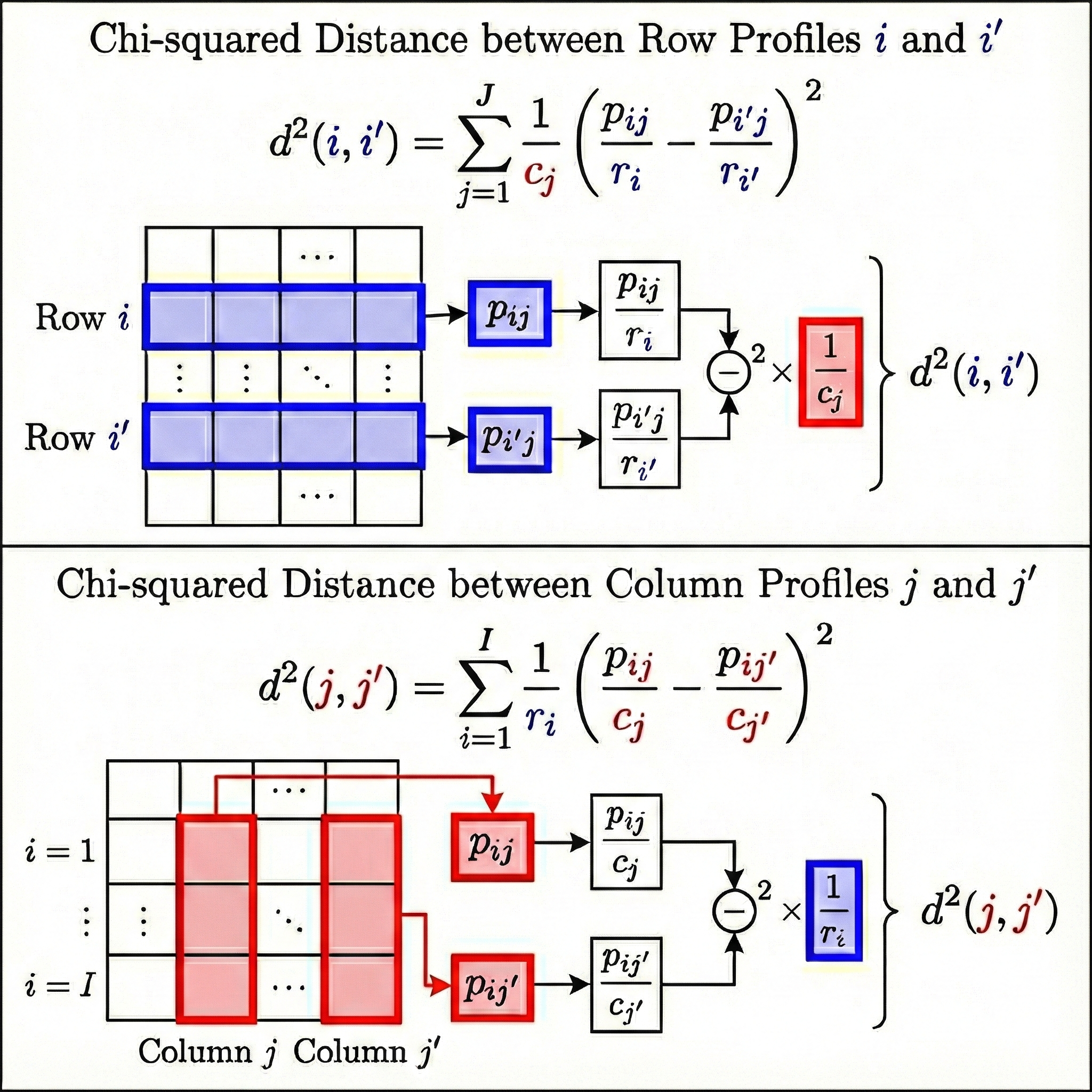
Definition of \(\chi^2\) distance

  • The \(\chi^2\) distance between two row profiles \(\color{blue}{i}\) and \(\color{blue}{i'}\): \[d^2(\color{blue}{i}, \color{blue}{i'}) = \sum_{j=1}^{J} \frac{1}{\color{red}{c_j}}\left(\frac{p_{\color{blue}{i}j}}{\color{blue}{r_i}} - \frac{p_{\color{blue}{i'}j}}{\color{blue}{r_{i'}}}\right)^2 \]
  • The \(\chi^2\) distance between two column profiles \(\color{red}{j}\) and \(\color{red}{j'}\): \[d^2(\color{red}{j}, \color{red}{j'}) = \sum_{i=1}^{I} \frac{1}{\color{blue}{r_i}}\left(\frac{p_{i\color{red}{j}}}{\color{red}{c_j}} - \frac{p_{i'\color{red}{j}}}{\color{red}{c_{j'}}}\right)^2\]

\(\chi^2\) distance in detail

Definition of \(\chi^2\) distance

  • The \(\chi^2\) distance between two row or column profiles measures how different they are using weighted difference.
  • Intuition: a small difference in a rare category is more significant than the same difference in a common category.
  • For example, consider \(\chi^2\)-distance of our workclass row profiles:
Code
import numpy as np
from scipy.spatial.distance import pdist, squareform
import pandas as pd

def chi_squared_distance_matrix(contingency_table):
    """
    Computes the pairwise Chi-squared distance matrix for the row profiles
    of a contingency table.
    
    Args:
        contingency_table (np.array or pd.DataFrame): The raw count data.
        
    Returns:
        pd.DataFrame: A square symmetric distance matrix.
    """
    # Ensure input is a numpy array
    data = np.array(contingency_table, dtype=float)
    
    # 1. Compute Row Profiles (r_ij = n_ij / n_i.)
    # Sum across columns to get row totals
    row_sums = data.sum(axis=1)[:, np.newaxis]
    # Avoid division by zero
    row_profiles = np.divide(data, row_sums, where=row_sums!=0)
    
    # 2. Compute Column Masses (c_j = n_.j / N)
    grand_total = data.sum()
    col_sums = data.sum(axis=0)
    col_masses = col_sums / grand_total
    
    # 3. Transform data for Weighted Euclidean Calculation
    # We weigh the coordinates by 1 / sqrt(col_masses)
    # This turns the Chi-sq distance into a standard Euclidean distance problem
    weights = 1.0 / np.sqrt(col_masses)
    transformed_data = row_profiles * weights
    
    # 4. Compute Pairwise Euclidean Distances on transformed data
    # pdist computes the upper triangle of the distance matrix
    distances = pdist(transformed_data, metric='euclidean')
    
    # Convert to a square matrix
    dist_matrix = squareform(distances)
    
    # Return as DataFrame for better readability if input was DataFrame
    if isinstance(contingency_table, pd.DataFrame):
        return pd.DataFrame(
            dist_matrix, 
            index=contingency_table.index, 
            columns=contingency_table.index
        )
    
    return dist_matrix

# Calculate Distances
dist_mat = chi_squared_distance_matrix(contingency_table)
dist_mat.round(2)
workclass Federal-gov Local-gov Private Self-emp-inc Self-emp-not-inc State-gov
workclass
Federal-gov 0.00 0.03 0.24 0.52 0.35 0.17
Local-gov 0.03 0.00 0.25 0.53 0.35 0.19
Private 0.24 0.25 0.00 0.67 0.50 0.11
Self-emp-inc 0.52 0.53 0.67 0.00 0.18 0.61
Self-emp-not-inc 0.35 0.35 0.50 0.18 0.00 0.44
State-gov 0.17 0.19 0.11 0.61 0.44 0.00

\(\chi^2\) distance in detail

Definition of \(\chi^2\) distance

  • The \(\chi^2\) distance between two row or column profiles measures how different they are using weighted difference.
  • Intuition: a small difference in a rare category is more significant than the same difference in a common category.
  • For example, consider \(\chi^2\)-distance of our workclass row profiles:
Code
dist_mat.round(2)
workclass Federal-gov Local-gov Private Self-emp-inc Self-emp-not-inc State-gov
workclass
Federal-gov 0.00 0.03 0.24 0.52 0.35 0.17
Local-gov 0.03 0.00 0.25 0.53 0.35 0.19
Private 0.24 0.25 0.00 0.67 0.50 0.11
Self-emp-inc 0.52 0.53 0.67 0.00 0.18 0.61
Self-emp-not-inc 0.35 0.35 0.50 0.18 0.00 0.44
State-gov 0.17 0.19 0.11 0.61 0.44 0.00
  • Here is the \(\chi^2\) distance matrix of marital.status column profiles:
marital.status Divorced Married-civ-spouse Married-spouse-absent Never-married Separated Widowed
marital.status
Divorced 0.00 0.27 0.16 0.22 0.13 0.15
Married-civ-spouse 0.27 0.00 0.30 0.40 0.32 0.22
Married-spouse-absent 0.16 0.30 0.00 0.15 0.10 0.25
Never-married 0.22 0.40 0.15 0.00 0.09 0.33
Separated 0.13 0.32 0.10 0.09 0.00 0.25
Widowed 0.15 0.22 0.25 0.33 0.25 0.00
  • Interpretation:
    • Row profiles: Federal-gov and Local-gov are the most similar row profiles, i.e., the martial status distribution of people working in these two workclasses are quite similar.
    • Column profiles: Separated and Divorced are the most similar column profiles, i.e., the workclass distribution of people with these two marital statuses are quite similar.

\(\chi^2\) distance in detail

  • \(\chi^2\) statistics: \[\chi^2=\sum_{i,j}\frac{(O_{ij}-E_{ij})^2}{E_{ij}}=\sum_{i,j}\frac{(Np_{\color{blue}{i}\color{red}{j}}-N\color{blue}{r_i}\color{red}{c_j})^2}{N\color{blue}{r_i}\color{red}{c_j}}=N\sum_{i,j}\frac{(p_{\color{blue}{i}\color{red}{j}}-\color{blue}{r_i}\color{red}{c_j})^2}{\color{blue}{r_i}\color{red}{c_j}}\]
  • Total inertia of row profiles: \[\color{blue}{I_X}=\sum_{i=1}^{I}\color{blue}{r_i}d^2(\color{blue}{i}, \color{blue}{\text{r}})=\sum_{i=1}^{I}\color{blue}{r_i}\sum_{j=1}^{J}\frac{1}{\color{red}{c_j}}\left(\frac{p_{\color{blue}{i}j}}{\color{blue}{r_i}} - \color{red}{c_j}\right)^2=\sum_{i,j}\frac{(p_{\color{blue}{i}\color{red}{j}}-\color{blue}{r_i}\color{red}{c_j})^2}{\color{blue}{r_i}\color{red}{c_j}}\]
  • Total inertia of column profiles: \[\color{red}{I_Y}=\sum_{j=1}^{J}\color{red}{c_j}d^2(\color{red}{j}, \color{red}{\text{c}})=\sum_{j=1}^{J}\color{red}{c_j}\sum_{i=1}^{I}\frac{1}{\color{blue}{r_i}}\left(\frac{p_{i\color{red}{j}}}{\color{red}{c_j}} - \color{blue}{r_i}\right)^2=\sum_{i,j}\frac{(p_{\color{blue}{i}\color{red}{j}}-\color{blue}{r_i}\color{red}{c_j})^2}{\color{blue}{r_i}\color{red}{c_j}}\]
  • Therefore: \(\color{blue}{I_X}=\color{red}{I_Y}=\chi^2/N\) (total inertia of the cloud of profiles).

\(\chi^2\) distance in detail

Geometric interpretation of \(\chi^2\) distance

  • The geometry defined by \(\chi^2\) distance is not the straight Euclidean space but distorted by the column weights.
  • Objective: find low-dimensional representation that best preserves the \(\chi^2\) distances between profiles.
  • This leads to Generalized SVD solution, which we will cover in the next section.

Generalized SVD
& Correspondence Analysis (CA)

GSVD & Correspondence Analysis (CA)

GSVD Recap

  • Recall that the GSVD of a \(q\)-rank matrix \(A\in\mathbb{R}^{n\times d}\) with row weights \(\color{blue}{W_r}\in\mathbb{R}^{n\times n}\) and column weights \(\color{red}{W_c}\in\mathbb{R}^{d\times d}\) is given by: \[\underbrace{A}_{n\times d} =\underbrace{U}_{n\times q}\overbrace{\Sigma}^{q\times q}\underbrace{V^T}_{q\times d}\text{ satisfying: }U^T \underbrace{\color{blue}{W_r}}_{\text{diagonal }n\times n} U=V^T \underbrace{\color{red}{W_c}}_{\text{diagonal }d\times d} V=I_q.\]
  • The GSVD of \((A, \color{blue}{W_r}, \color{red}{W_c})\) can be computed via the SVD of the matrix: \[B = \color{blue}{W_r}^{1/2} A \color{red}{W_c}^{1/2}\]
  • If SVD gives \(B=\tilde{U}\Delta\tilde{V}^T\), with left and right singular vectors \(\tilde{U}\) and \(\tilde{V}\) respectively, thus \(A\) the left and right sigular vectors of \(A\) is given by: \[U = \color{blue}{W_r}^{-1/2} \tilde{U}, \quad V = \color{red}{W_c}^{-1/2} \tilde{V},\quad \Sigma = \Delta.\]

GSVD & Correspondence Analysis (CA)

CA via GSVD

  • Given the contingency table \(P=(p_{ij})\) of relative frequencies, with row and column marginals \(\color{blue}{\text{r}}\) and \(\color{red}{\text{c}}\), we define:
    • Row and column weights (metrics): \(\color{blue}{D_r^{-1}} = \text{diag}(\color{blue}{\text{r}})^{-1}\) & \(\color{red}{D_c^{-1}} = \text{diag}(\color{red}{\text{c}})^{-1}\).
    • Residual matrix: \(S = P - \color{blue}{\text{r}} \color{red}{\text{c}}^T\).
  • The CA of \(P\) is obtained by the GSVD of the triplet \((S, \color{blue}{D_r^{-1}}, \color{red}{D_c^{-1}})\): \[S = U \Sigma V^T \text{ satisfying: } U^T \color{blue}{D_r^{-1}} U =V^T \color{red}{D_c^{-1}} V = I.\]
  • Principal coordinates: projection of profiles onto axes, scaled by the sigular values, given by: \[F = \underbrace{\color{blue}{D_r^{-1}}}_{\text{Weight normalization}} \overbrace{U}^{\text{Rotation}}\underbrace{\Sigma}_{\text{Scale}}, \quad G = \color{red}{D_c^{-1}} V \Sigma\]
Code
import numpy as np
from scipy.linalg import svd
S = contingency_table.values / N - np.outer(contingency_table.sum(axis=1).values / N, contingency_table.sum(axis=0).values / N)
pd.DataFrame(S.round(3), 
      index=contingency_table.index, 
      columns=contingency_table.columns)
marital.status Divorced Married-civ-spouse Married-spouse-absent Never-married Separated Widowed
workclass
Federal-gov 0.001 0.001 -0.0 -0.002 -0.000 0.000
Local-gov 0.003 0.001 -0.0 -0.005 -0.000 0.001
Private -0.001 -0.028 0.0 0.028 0.001 -0.001
Self-emp-inc -0.002 0.010 -0.0 -0.008 -0.000 -0.000
Self-emp-not-inc -0.002 0.016 -0.0 -0.013 -0.001 0.000
State-gov 0.001 -0.001 0.0 -0.000 0.000 -0.000

Dim 1 Dim 2
workclass
Federal-gov 0.103 -0.136
Local-gov 0.103 -0.151
Private -0.087 0.015
Self-emp-inc 0.574 0.084
Self-emp-not-inc 0.411 0.021
State-gov -0.019 -0.038

Dim 1 Dim 2
marital.status
Divorced -0.055 -0.110
Married-civ-spouse 0.180 0.019
Married-spouse-absent -0.108 0.012
Never-married -0.224 0.031
Separated -0.139 -0.006
Widowed 0.053 -0.135

GSVD & Correspondence Analysis (CA)

CA via GSVD

  • Variance explained by axis \(i\) is given by \(\sigma_i^2=\Sigma_{ii}^2\).
  • Explained variance ratio of axis \(i\) is given by: \(\sigma_i^2/\sum_{j=1}^q\sigma_j^2\).
Code
pd.DataFrame({
    'Explained variance' : Sigma**2,
    'Explained variance ratio' : Sigma**2 / (Sigma ** 2).sum(),
    'Cummulated explained variance ratio' : (Sigma**2).cumsum() / (Sigma**2).sum()
}, index=range(1, len(Sigma)+1)).round(3).T
1 2 3 4 5 6
Explained variance 0.033 0.003 0.000 0.000 0.0 0.0
Explained variance ratio 0.916 0.075 0.006 0.003 0.0 0.0
Cummulated explained variance ratio 0.916 0.991 0.997 1.000 1.0 1.0
Code
import plotly.express as px
import plotly.graph_objects as go

# 1. Plot F2 (Base Layer): Blue Squares
fig = px.scatter(F2, x='Dim 1', y='Dim 2', text=F2.index)
fig.update_traces(
    textposition='top center',  # Shifts text up
    marker=dict(
        color='blue', 
        symbol='diamond', 
        size=12                 # Increases point size
    )
)

# 2. Add G2 (Second Layer): Red Round (Circle)
trace_g2 = px.scatter(G2, x='Dim 1', y='Dim 2', text=G2.index)
trace_g2.update_traces(
    textposition='top center',  # Shifts text up
    marker=dict(
        color='red', 
        symbol='circle', 
        size=12                 # Increases point size
    )
)
fig.add_trace(trace_g2.data[0])

# 3. Add Lines: Gray and Dashed
fig.add_trace(go.Scatter(
    x=[-0.4, 0.7], y=[0,0], mode='lines', 
    line=dict(color='gray', dash='dash', width=1)
))

fig.add_trace(go.Scatter(
    x=[0,0], y=[min(G2['Dim 2'])*1.5, 0.15], mode='lines', 
    line=dict(color='gray', dash='dash', width=1)
))

fig.update_layout(width=600, height=250, showlegend=False)
fig.show()

Code
import numpy as np
from scipy.linalg import svd
pd.DataFrame(S.round(3), 
      index=contingency_table.index, 
      columns=contingency_table.columns)
marital.status Divorced Married-civ-spouse Married-spouse-absent Never-married Separated Widowed
workclass
Federal-gov 0.001 0.001 -0.0 -0.002 -0.000 0.000
Local-gov 0.003 0.001 -0.0 -0.005 -0.000 0.001
Private -0.001 -0.028 0.0 0.028 0.001 -0.001
Self-emp-inc -0.002 0.010 -0.0 -0.008 -0.000 -0.000
Self-emp-not-inc -0.002 0.016 -0.0 -0.013 -0.001 0.000
State-gov 0.001 -0.001 0.0 -0.000 0.000 -0.000

Dim 1 Dim 2
workclass
Federal-gov 0.103 -0.136
Local-gov 0.103 -0.151
Private -0.087 0.015
Self-emp-inc 0.574 0.084
Self-emp-not-inc 0.411 0.021
State-gov -0.019 -0.038

Dim 1 Dim 2
marital.status
Divorced -0.055 -0.110
Married-civ-spouse 0.180 0.019
Married-spouse-absent -0.108 0.012
Never-married -0.224 0.031
Separated -0.139 -0.006
Widowed 0.053 -0.135

GSVD & Correspondence Analysis (CA)

CA via GSVD

  • Variance explained by axis \(i\) is given by \(\sigma_i^2=\Sigma_{ii}^2\).
  • Explained variance ratio of axis \(i\) is given by: \(\sigma_i^2/\sum_{j=1}^q\sigma_j^2\).
Code
pd.DataFrame({
    'Explained variance' : Sigma**2,
    'Explained variance ratio' : Sigma**2 / (Sigma ** 2).sum(),
    'Cummulated explained variance ratio' : (Sigma**2).cumsum() / (Sigma**2).sum()
}, index=range(1, len(Sigma)+1)).round(3).T
1 2 3 4 5 6
Explained variance 0.033 0.003 0.000 0.000 0.0 0.0
Explained variance ratio 0.916 0.075 0.006 0.003 0.0 0.0
Cummulated explained variance ratio 0.916 0.991 0.997 1.000 1.0 1.0
Code
import plotly.express as px
import plotly.graph_objects as go

# 1. Plot F2 (Base Layer): Blue Squares
fig = px.scatter(F2, x='Dim 1', y='Dim 2', text=F2.index)
fig.update_traces(
    textposition='top center',  # Shifts text up
    marker=dict(
        color='blue', 
        symbol='diamond', 
        size=12                 # Increases point size
    )
)

# 2. Add G2 (Second Layer): Red Round (Circle)
trace_g2 = px.scatter(G2, x='Dim 1', y='Dim 2', text=G2.index)
trace_g2.update_traces(
    textposition='top center',  # Shifts text up
    marker=dict(
        color='red', 
        symbol='circle', 
        size=12                 # Increases point size
    )
)
fig.add_trace(trace_g2.data[0])

# 3. Add Lines: Gray and Dashed
fig.add_trace(go.Scatter(
    x=[-0.4, 0.7], y=[0,0], mode='lines', 
    line=dict(color='gray', dash='dash', width=1)
))

fig.add_trace(go.Scatter(
    x=[0,0], y=[min(G2['Dim 2'])*1.5, 0.15], mode='lines', 
    line=dict(color='gray', dash='dash', width=1)
))

fig.update_layout(width=600, height=250, showlegend=False)
fig.show()

marital.status Divorced Married-civ-spouse Married-spouse-absent Never-married Separated Widowed Sum
workclass
Federal-gov 0.176 0.492 0.011 0.256 0.027 0.038 1.0
Local-gov 0.176 0.489 0.011 0.253 0.030 0.041 1.0
Private 0.138 0.429 0.013 0.361 0.033 0.026 1.0
Self-emp-inc 0.090 0.750 0.004 0.112 0.018 0.026 1.0
Self-emp-not-inc 0.115 0.662 0.012 0.161 0.021 0.029 1.0
State-gov 0.162 0.453 0.013 0.318 0.033 0.020 1.0

marital.status Divorced Married-civ-spouse Married-spouse-absent Never-married Separated Widowed
workclass
Federal-gov 0.039 0.033 0.028 0.025 0.027 0.043
Local-gov 0.087 0.071 0.057 0.053 0.066 0.103
Private 0.733 0.679 0.778 0.826 0.786 0.701
Self-emp-inc 0.023 0.058 0.013 0.013 0.021 0.035
Self-emp-not-inc 0.069 0.117 0.080 0.041 0.055 0.088
State-gov 0.049 0.041 0.044 0.042 0.045 0.031
Sum 1.000 1.000 1.000 1.000 1.000 1.000
  • Near origin: State-gov & Private are close to origin meaning that their profiles are similar to the mean column profile \(\color{red}{\text{c}}\).
  • Axis 1: Separate self-employment type from government type works of the column profiles, and good vs bad/non-marriage.
  • Axis 2: Separate stability or life stage in marriage for column profile, and separation of government and non-government works.
  • Clusters: Similar profiles are clustered together, and association between different categories of row and column profiles are also grouped together.
  • Deviation from origin: indication of rare categories or difference to the mean profile.

GSVD & Correspondence Analysis (CA)

Symmetric Biplot

This symmetric biplot summarize the connection between:

  • Similar type of profiles: similar rows or columns.
  • Association between different type (row vs column) of profiles.
  • Rare profiles/very different from mean profile.
  • Similar to common/mean profile.
  • The explained variances indicate how much each axis captures the variation of the data.
  • All \(\sigma_j\in[0,1]\) and \(\sigma_j=1\) only for perfect association meaning that there is a group of row profiles that only associate to a certain group of column profiles and vice versa.
  • Connection between principal row and column coordinates: \[\begin{align*} % Row coordinate f_{ik} as a weighted average of column coordinates g_{jk} \color{blue}{f_{ik}} &= \frac{1}{\sigma_k} \sum_{j} \left( \frac{p_{ij}}{\color{blue}{r_i}} \right) \color{red}{g_{ik}}, \qquad % Column coordinate \color{red}{g_{ik}} as a weighted average of row coordinates f_{ik} \color{red}{g_{ik}}= \frac{1}{\sigma_k} \sum_{i} \left( \frac{p_{ij}}{\color{red}{c_j}} \right) \color{blue}{f_{ik}} \end{align*}\]

🥳 Yeahhh! Party Time…. 🥂


Any questions?