

Naive Bayes Classifier


Advanced Machine Learning


Lecturer: Dr. HAS Sothea

🗺️ Content

  • Motivation and Introduction

  • Naive Bayes Classifier (NBC)

    • NBC Model Setting and Assumption
    • Application
    • Handling Imbalanced Data

Motivation & Introduction

Motivation & Introduction

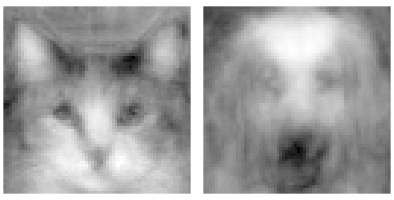
  • We humans can effortlessly recognize cats and dogs:

  • No sweat even with these kind of patterns:

  • How can we make a computer program learns to do this?
  • Other than cats & dogs, it’s much more useful to identify
    • Email spams
    • Frauds in banking systems
    • Diseases in health care system

Motivation & Introduction

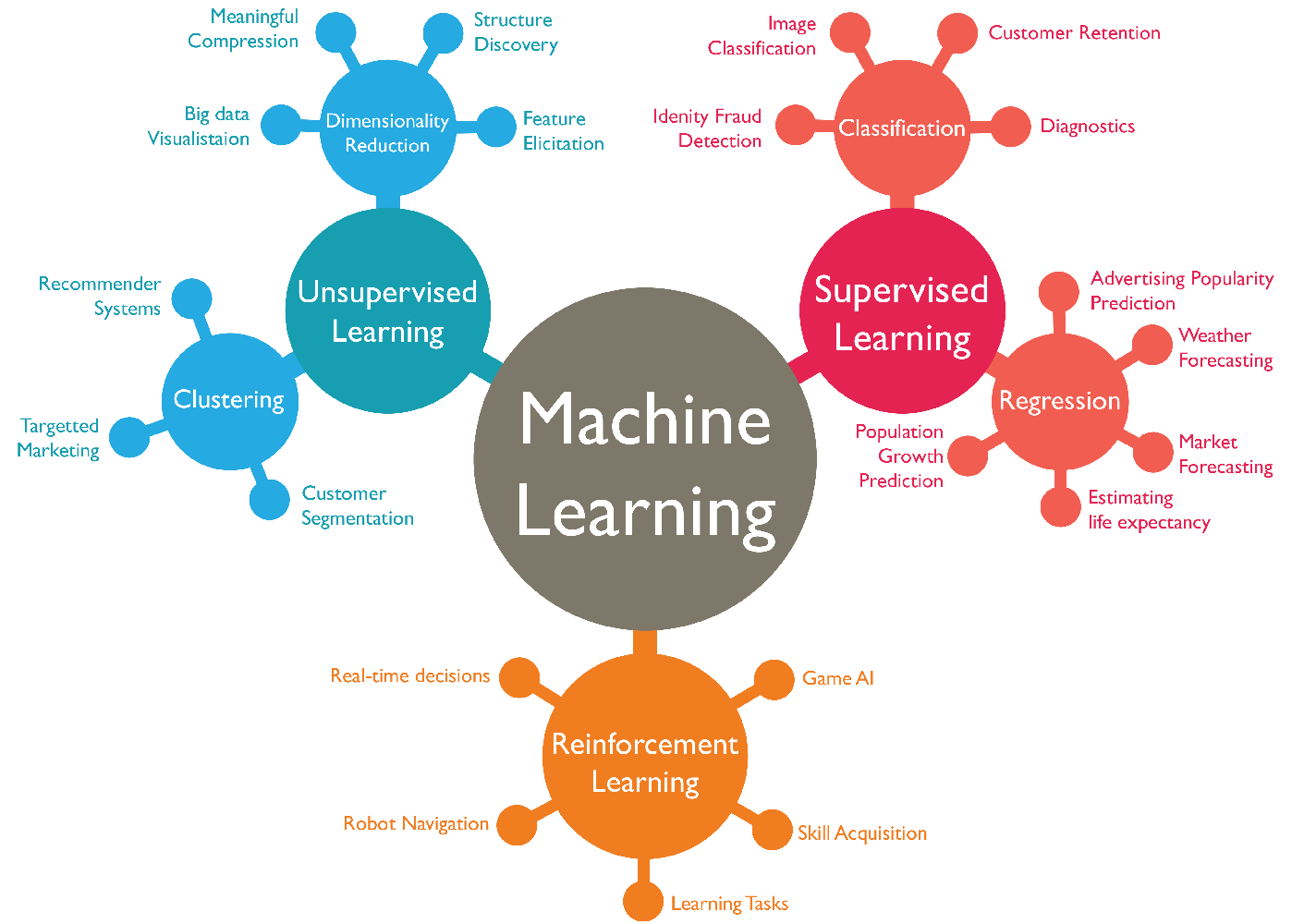
  • Machine Learning (ML): a branch of AI focused on enabling computers/machines to imitate the way that humans learn.

  • Three main branches:
    • Supervised Learning: for predicting some target (categorical or numerical).
    • Unsupervised Learning: for grouping, understanding and reducing the dimension of the data (not for predicting).
    • Reinforcement Learning: a model works on some tasks and learn to improve itself based on how it’s performed so far.

I. Naive Bayes Classifier (NBC)

1. Setting and Main Assumption

1. Setting and Main Assumption

Binary NBC

  • Consider Email spam dataset :
make address all num3d our over remove internet order mail ... charSemicolon charRoundbracket charSquarebracket charExclamation charDollar charHash capitalAve capitalLong capitalTotal type
0 0.00 0.64 0.64 0.0 0.32 0.00 0.00 0.00 0.00 0.00 ... 0.00 0.000 0.0 0.778 0.000 0.000 3.756 61 278 spam
1 0.21 0.28 0.50 0.0 0.14 0.28 0.21 0.07 0.00 0.94 ... 0.00 0.132 0.0 0.372 0.180 0.048 5.114 101 1028 spam
2 0.06 0.00 0.71 0.0 1.23 0.19 0.19 0.12 0.64 0.25 ... 0.01 0.143 0.0 0.276 0.184 0.010 9.821 485 2259 spam

3 rows × 58 columns

  • Input matrix \(M\in\mathbb{R}^{n\times d}\): \[M=\begin{pmatrix} x_{1,1} & x_{1,2} & \dots & x_{1,d}\\ x_{2,1} & x_{2,2} & \dots & x_{2,d}\\ \vdots & \vdots & \ddots & \vdots\\ x_{n,1} & x_{n,2} & \dots & x_{n,d} \end{pmatrix}\]

  • Target vector \(\text{y}\in\mathbb{R}\): \[\text{y}=\begin{pmatrix} y_{1}\\ y_{2}\\ \vdots\\ y_{n}\end{pmatrix}\]

1. Setting and Main Assumption

Binary NBC

  • Consider Email spam dataset :
make address all num3d our over remove internet order mail ... charSemicolon charRoundbracket charSquarebracket charExclamation charDollar charHash capitalAve capitalLong capitalTotal type
0 0.00 0.64 0.64 0.0 0.32 0.00 0.00 0.00 0.00 0.00 ... 0.00 0.000 0.0 0.778 0.000 0.000 3.756 61 278 spam
1 0.21 0.28 0.50 0.0 0.14 0.28 0.21 0.07 0.00 0.94 ... 0.00 0.132 0.0 0.372 0.180 0.048 5.114 101 1028 spam
2 0.06 0.00 0.71 0.0 1.23 0.19 0.19 0.12 0.64 0.25 ... 0.01 0.143 0.0 0.276 0.184 0.010 9.821 485 2259 spam

3 rows × 58 columns

  • Input \(\text{x}_i=(x_{i1},x_{i2},\dots, x_{id})\): Bag of words of email \(i\).
  • Input matrix \(M\in\mathbb{R}^{n\times d}\): \[M=\begin{pmatrix} x_{1,1} & x_{1,2} & \dots & x_{1,d}\\ x_{2,1} & x_{2,2} & \dots & x_{2,d}\\ \vdots & \vdots & \ddots & \vdots\\ x_{n,1} & x_{n,2} & \dots & x_{n,d} \end{pmatrix}\]

  • Target vector \(\text{y}\in\mathbb{R}\): \[\text{y}=\begin{pmatrix} y_{1}\\ y_{2}\\ \vdots\\ y_{n}\end{pmatrix}\]

1. Setting and Main Assumption

Binary NBC

  • Consider Email spam dataset :
make address all num3d our over remove internet order mail ... charSemicolon charRoundbracket charSquarebracket charExclamation charDollar charHash capitalAve capitalLong capitalTotal type
0 0.00 0.64 0.64 0.0 0.32 0.00 0.00 0.00 0.00 0.00 ... 0.00 0.000 0.0 0.778 0.000 0.000 3.756 61 278 spam
1 0.21 0.28 0.50 0.0 0.14 0.28 0.21 0.07 0.00 0.94 ... 0.00 0.132 0.0 0.372 0.180 0.048 5.114 101 1028 spam
2 0.06 0.00 0.71 0.0 1.23 0.19 0.19 0.12 0.64 0.25 ... 0.01 0.143 0.0 0.276 0.184 0.010 9.821 485 2259 spam

3 rows × 58 columns

  • Input \(\text{x}_i=(x_{i1},x_{i2},\dots, x_{id})\): Bag of words of email \(i\).
  • Target \(y_i\in\{1,0\}\) with \(1=\) spam and \(0=\) nonspam.
  • Objective: Classify if an email is a spam or not based on its input.
  • Data shape: (4601, 58).
  • Total missing values: 0.
  • Total duplicated rows: 391.
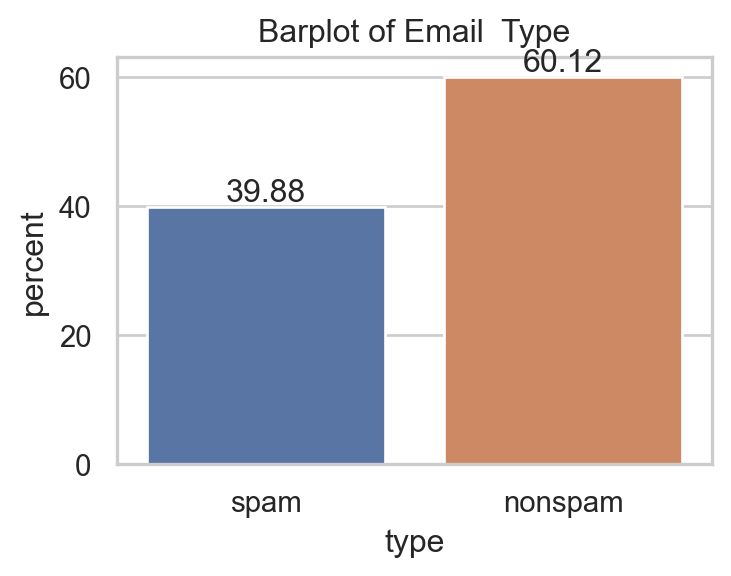
  • After removing duplicates:
Code
import seaborn as sns
import matplotlib.pyplot as plt
sns.set(style="whitegrid")
_, ax = plt.subplots(1,1,figsize=(4,2.75))
spam.drop_duplicates(inplace=True)
sns.countplot(data=spam, x="type", hue="type", stat="percent")
ax.set_title("Barplot of Email  Type")
ax.bar_label(ax.containers[0], fmt="%.2f")
ax.bar_label(ax.containers[1], fmt="%.2f")
plt.show()

1. Setting and Main Assumption

Model Motivation

  • Given an email (input) \(\text{x}_i=(0, 0.64,\dots,278)\in\mathbb{R}^{57}\), how would you guess its type \(y_i\)?
  • 🔑 The most important quantity in (binary) classification: \[\color{blue}{\mathbb{P}(Y_i=1|X=\text{x}_i)}.\] Interpretation: Given input \(\text{x}_i\), how likely that it belongs to class 1 (spam)?
  • Decision rule: \[\text{ Email x}_i\text{ is a spam }\Leftrightarrow\color{blue}{\mathbb{P}(Y_i=1|X=\text{x}_i)}\geq 0.5.\]
  • From now, building a classifier is just trying to estimate this \[\color{blue}{\mathbb{P}(Y_i=1|X=\text{x}_i)}.\]

1. Setting and Main Assumption

Recall Bayes’s Theorem

Bayes’s Theorem

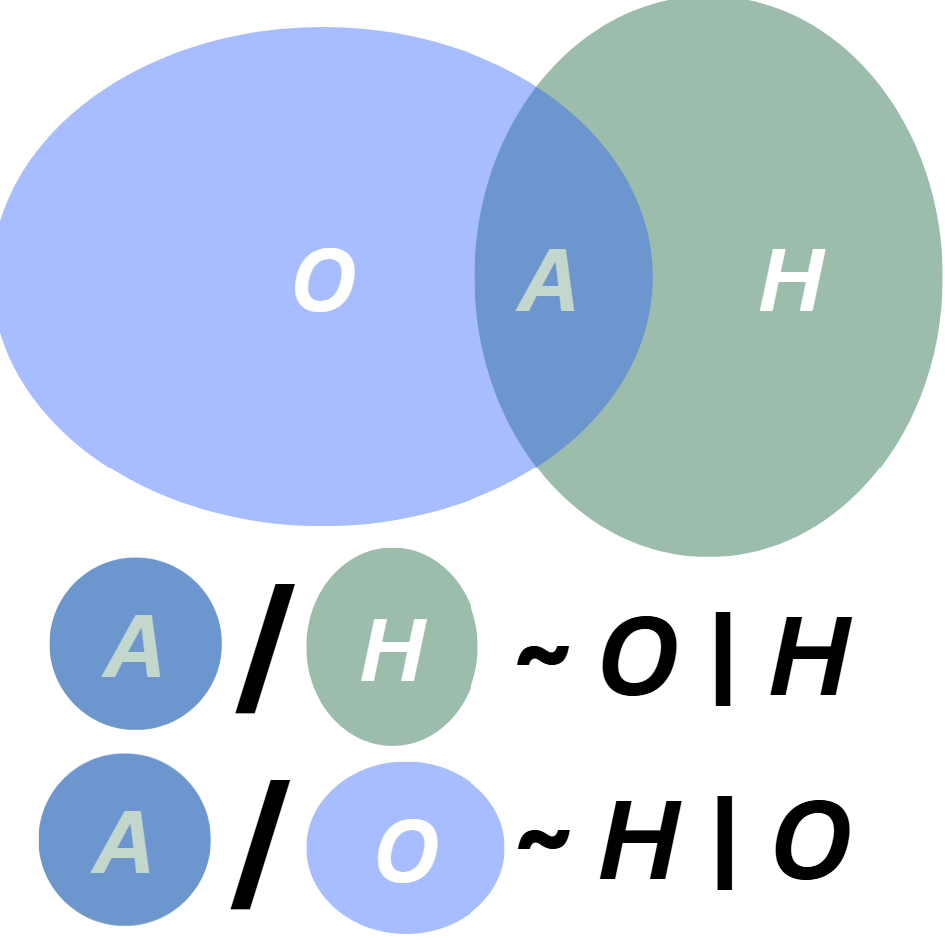
For any two events \(O,H\) with \(\mathbb{P}(O)\times\mathbb{P}(H)>0,\) \[\begin{equation}\overbrace{\mathbb{P}(H|O)}^{\text{Posterior}}=\frac{\overbrace{\mathbb{P}(O|H)}^{\text{Likelihood}}\times\overbrace{\mathbb{P}(H)}^{\text{Prior}}}{\underbrace{\mathbb{P}(O)}_{\text{Marginal}}}.\end{equation}\]

  • \(\mathbb{P}(H)\): Prior belief of having hypothesis \(H\).
  • \(\mathbb{P}(O|H)\): If \(H\) is true, how likely for \(O\) to be observed?
  • \(\mathbb{P}(H|O)\): If \(O\) is observed, how likely for \(H\) to be true?
  • \(\mathbb{P}(O)\): How likely for \(O\) to be observed in general?

1. Setting and Main Assumption

Model Setting

  • Bayes’s theorem implies: \[\begin{align*}\color{blue}{\mathbb{P}(Y_i=1|X=\text{x}_i)}&=\frac{\color{red}{\mathbb{P}(X=\text{x}_i|Y_i=1)}\times\color{green}{\mathbb{P}(Y_i=1)}}{\mathbb{P}(X=\text{x}_i)}\\ &\propto \color{red}{\mathbb{P}(X=\text{x}_i|Y_i=1)}\times\color{green}{\mathbb{P}(Y_i=1)}.\end{align*}\]

  • Interpretation:

    • \(\color{green}{\mathbb{P}(Y_i=1)}\): The chance that an email \(i\) is a spam.
    • \(\color{red}{\mathbb{P}(X=\text{x}_i|Y_i=1)}\): If email \(i\) is a spam, how likely that its input is \(\text{x}_i\).
  • \(\color{green}{\mathbb{P}(Y_i=1)}\) is easy to estimate 😊: \(\frac{\text{Number of all Spams}}{\text{Number of total emails}}\).

  • \(\color{red}{\mathbb{P}(X=\text{x}_i|Y_i=1)}\) is very complicated to estimate 🥹.

1. Setting and Main Assumption

Main assumption & key quantity in NBC

Main assumption of NBC

  • Within any class \(k\in\{1,0\}\), the components of input \(X|Y=k\) are indpendent i.e., \[\color{red}{\mathbb{P}(X=\text{x}|Y=k)}=\prod_{j=1}^d\mathbb{P}(X_j=x_j|Y=k).\]

Key quantity in NBC

  • From above, the classification probability is computed by

\[\mathbb{P}(Y=1|X=\text{x})\propto \color{green}{\mathbb{P}(Y=1)}\color{red}{\prod_{j=1}^d\mathbb{P}(X_j=x_j|Y=1)},\]

1. Setting and Main Assumption

Main assumption & key quantity in NBC

Key quantity in NBC

  • From above, the classification probability is computed by

\[\mathbb{P}(Y=1|X=\text{x})\propto \color{green}{\mathbb{P}(Y=1)}\color{red}{\prod_{j=1}^d\mathbb{P}(X_j=x_j|Y=1)}.\]

  • \(\color{red}{\mathbb{P}(X_j=x_j|Y=1)}\) is just 1D distribution and can be estimated \(^{\small\text{📚}}\) as follows:
Type of \(X_j\) Distribution Graphic
Qualitative Bernoulli, Multinomial… barplot, countplot
Quantitative Gausian, Exponential… displot, hist, density

1. Setting and Main Assumption

Main assumption & key quantity in NBC

Key quantity in NBC

  • From above, the classification probability is computed by

\[\mathbb{P}(Y=1|X=\text{x})\propto \color{green}{\mathbb{P}(Y=1)}\color{red}{\prod_{j=1}^d\mathbb{P}(X_j=x_j|Y=1)}.\]

Code
import plotly.figure_factory as ff
import plotly.express as px
from plotly.subplots import make_subplots
import plotly.graph_objects as go

fig = make_subplots(cols=2, rows=1, subplot_titles=("Exclamation", "CapitalTotal"))
temp1 = px.histogram(spam, x='charExclamation', color='type', nbins=10000)
temp1.data[0].showlegend=False
temp1.data[1].showlegend=False
temp2 = px.histogram(spam, x='capitalTotal', color='type', nbins=2)
fig.add_trace(temp1.data[0], row=1, col=1)
fig.add_trace(temp1.data[1], row=1, col=1)
fig.add_trace(temp2.data[0], row=1, col=2)
fig.add_trace(temp2.data[1], row=1, col=2)
fig.update_yaxes(type='log', row=1, col=1)
# fig.update_xaxes(type='log', row=1, col=2)
fig.update_layout(width=1000, height=230)
fig.show()

1. Setting and Main Assumption

\(M\)-class Naive Bayes Classifier

  • Suppose the target \(y\in\{1,2,...,M\}\).

Key quantity

  • For any \(d\)-dimensional input \(\text{x}\) and \(k\in\{1,2,...,M\}\):

\[\color{blue}{\mathbb{P}(Y=k|X=\text{x})}\propto\color{green}{\mathbb{P}(Y=k)}\color{red}{\prod_{j=1}^d\mathbb{P}(X_j=x_j|Y=k)}.\]

Classification Rule

\[\text{x}\text{ belongs to class }\color{blue}{k^*}\text{ if }\color{blue}{\mathbb{P}(Y=k^*|X=\text{x})}=\max_{1\leq k\leq M}\color{blue}{\mathbb{P}(Y=k|X=\text{x})}.\]

2. Application

2. Application

Email type vs only 3 inputs

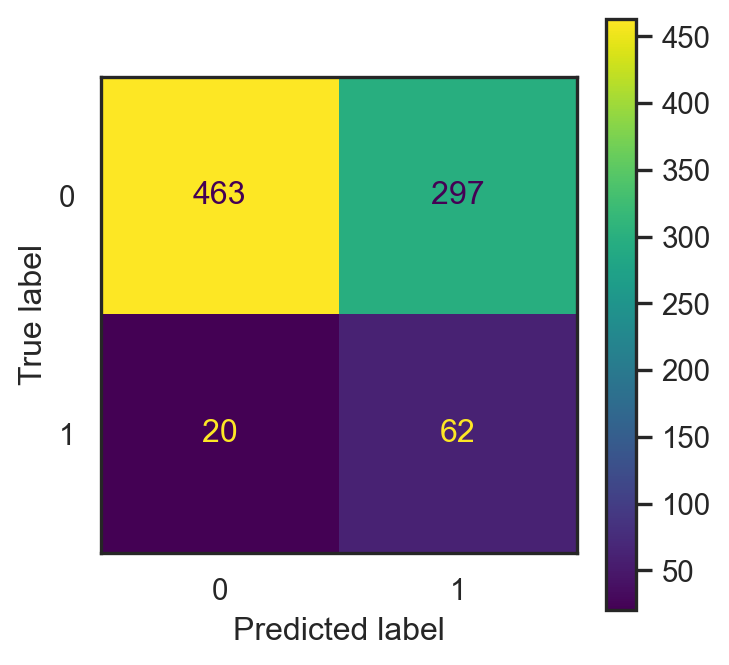
  • If \(\text{x}=(\)make, address, capitalTotal\()\).
  • Test data: \(20\%\) of all observations.
Code
from sklearn.naive_bayes import GaussianNB
from sklearn.metrics import confusion_matrix, ConfusionMatrixDisplay
from sklearn.model_selection import train_test_split
sns.set(style="white")
X_train2, X_test2, y_train2, y_test2 = train_test_split(spam[["make","address", "capitalTotal"]], spam.iloc[:,57], test_size = 0.2, random_state=42)
nb2 = GaussianNB()
_, ax = plt.subplots(1,1, figsize=(4,4))
nb2 = nb2.fit(X_train2, y_train2)
pred2 = nb2.predict(X_test2)
conf2 = confusion_matrix(pred2, y_test2)
con_fig2 = ConfusionMatrixDisplay(conf2)
pr2 = nb2.predict_proba(X_test2)[:,1]
con_fig2.plot(ax=ax)
plt.show()

  • Accuracy: proportion of correctly classified emails.

\[\frac{463+62}{463+62+20+297}\approx 0.624.\]

  • Misclassification error: \[1-\text{accuracy}\approx0.376.\]
  • This depends on the split ⚠️

2. Application

Email type vs all inputs

  • Data: \(\text{x}\in\mathbb{R}^{57},y\in\{0,1\}\).
  • Test data: the same \(20\%\).
Code
X_train1, X_test1, y_train1, y_test1 = train_test_split(spam.iloc[:,:57], spam.iloc[:,57], test_size = 0.2, random_state=42)
_, ax = plt.subplots(1,1, figsize=(4,4))
nb1 = GaussianNB()
nb1 = nb1.fit(X_train1, y_train1)
pred1 = nb1.predict(X_test1)
conf1 = confusion_matrix(pred1, y_test1)
con_fig1 = ConfusionMatrixDisplay(conf1)
pr1 = nb1.predict_proba(X_test1)[:,1]
con_fig1.plot(ax=ax)
plt.show()

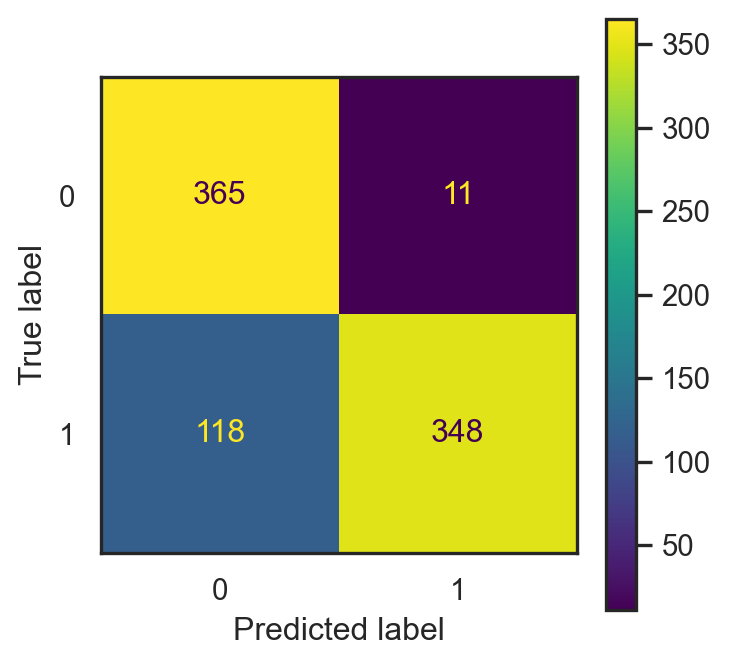
  • Accuracy: proportion of correctly classified emails.

\[\frac{365+348}{365+348+11+118}\approx 0.846.\]

  • Misclassification error: \[1-\text{accuracy}\approx 0.154.\]
  • This depends on the split ⚠️

2. Application

Email type vs Selected Inputs

  • Visualize type against inputs can help us filter useful input features.
  • There are too many features, we can apply statistical method, for example, ANOVA.
Code
from scipy.stats import f_oneway
# Initialize list to store selected features
selected_features = []
p_values = {}

# Get feature column names (excluding the target)
feature_columns = [col for col in spam.columns if col != 'type']

# For loop to test each feature
for feature in feature_columns:
    # Get unique classes in target variable
    classes = spam['type'].unique()

    # Create groups for ANOVA test
    groups = []
    for class_label in classes:
        group_data = spam[spam['type'] == class_label][feature]
        groups.append(group_data)
    
    # Perform one-way ANOVA
    f_stat, p_value = f_oneway(*groups)
    
    # Store p-value
    p_values[feature] = p_value
    
    # Select feature if p-value < 1e-15
    if p_value < 1e-15:
        selected_features.append(feature)
# Create DataFrame with only selected features and target
if selected_features:
    filtered_data = spam[selected_features]
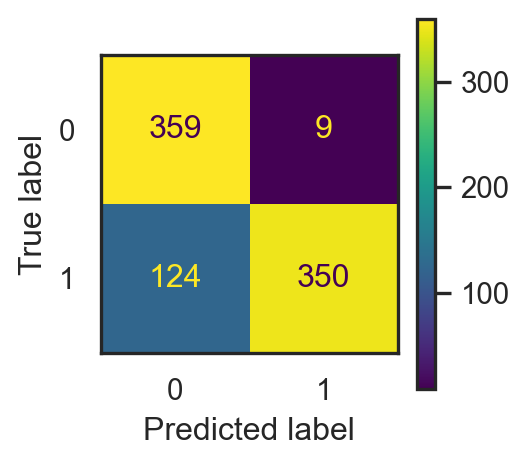
  • Number of selected features: 38.

  • Accuracy:

\[\frac{359+350}{359+350+9+124}\approx 0.842.\]

  • Misclassification error: \[1-\text{accuracy}\approx 0.158.\]
  • This depends on the split ⚠️

3. Pros & Cons of NBC

3. Pros & Cons of NBC

Pros

  • Efficiency & simplicity
  • Less training data requirement
  • Scalability: works well on large and high-dimensional data
  • Ability to handle categorical data
  • Ability to handle missing data
  • Sometimes, it still works well even thought the assumption of independence is violeted.

Cons

  • May perform poorly when features are highly correlated due to the violation of independence assumption.
  • May not work well for complex relationship.
  • Zero probability: when some categories are not presented in some training features.
  • Continuous features often be modeled using Gaussian distribution, which might not always be appropriate.

II. Imbalanced Data ⚠️

1. Imbalanced data ⚠️

1. Imbalanced data ⚠️

  • If the data contains \(95\%\) nonspam, always guessing nonspam gives \(0.95\) accuracy!
  • Accuracy isn’t the right metric for imbalanced data ⚠️

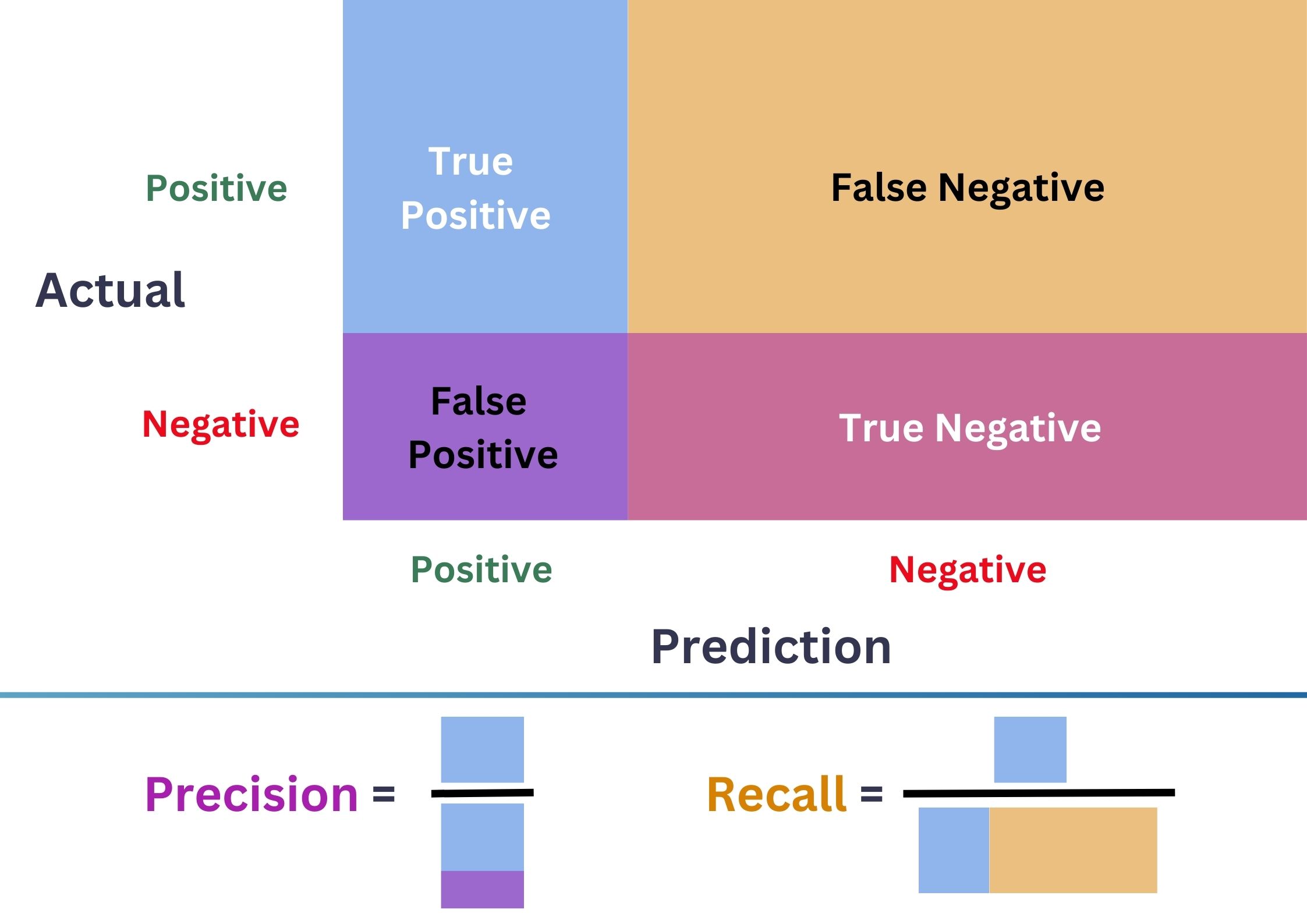
Confustion Matrix


  • \(\color{purple}{\text{Precision}}=\frac{\color{CornflowerBlue}{\text{TP}}}{\color{CornflowerBlue}{\text{TP}}+\color{purple}{\text{FP}}}\)
  • \(\color{Tan}{\text{Recall}}=\frac{\color{CornflowerBlue}{\text{TP}}}{\color{CornflowerBlue}{\text{TP}}+\color{Tan}{\text{FN}}}\)
  • \(\color{ForestGreen}{\text{F1-score}}=\frac{2.\color{purple}{\text{Precision}}.\color{Tan}{\text{Recall}}}{\color{purple}{\text{Precision}}+\color{Tan}{\text{Recall}}}\).
  • \(\color{ForestGreen}{\text{F1-score}}\) balances \(\color{purple}{\text{FP}}\) & \(\color{Tan}{\text{FN}}\).

1. Imbalanced data ⚠️

  • \(\color{purple}{\text{Precision}}=\frac{\color{CornflowerBlue}{\text{TP}}}{\color{CornflowerBlue}{\text{TP}}+\color{purple}{\text{FP}}}\)
  • \(\color{Tan}{\text{Recall}}=\frac{\color{CornflowerBlue}{\text{TP}}}{\color{CornflowerBlue}{\text{TP}}+\color{Tan}{\text{FN}}}\)
  • \(\color{ForestGreen}{\text{F1-score}}=\frac{2.\color{purple}{\text{Precision}}.\color{Tan}{\text{Recall}}}{\color{purple}{\text{Precision}}+\color{Tan}{\text{Recall}}}\).
Code
import plotly.graph_objects as go
x = np.linspace(0,1,20)
y = np.linspace(0,1,20)
z1 = [[2*x[i]*y[j]/(x[i]+y[j]) for j in range(len(y))] for i in range(len(x))]
z2 = [[(x[i]+y[j])/2 for j in range(len(y))] for i in range(len(x))]

camera = dict(
    eye=dict(x=1.7, y=-1.2, z=1.2)
)

fig = go.Figure(go.Surface(x = x,
                           y = y,
                           z = z1,
                           name = "F1-score",
                           colorscale = "Blues",
                           showscale = False))
fig.add_trace(go.Surface(x = x,
                         y = y,
                         z = z2,
                        name = "Mean",
                        colorscale = "Electric",
                        showscale = False))
fig.update_layout(scene = dict(
                    xaxis_title='Precision',
                    yaxis_title='Recall',
                    zaxis_title='Scores'),
                  title = dict(text="F1-score vs Mean", 
                               y=0.9,
                               x=0.5,
                               font=dict(size = 30, 
                                         color = "#1C66B5")
                              ),
                  scene_camera=camera,
                  width = 500,
                  height = 500)
fig.show()

1. Imbalanced data ⚠️

Receiver Operating Characteristic Curve (ROC)

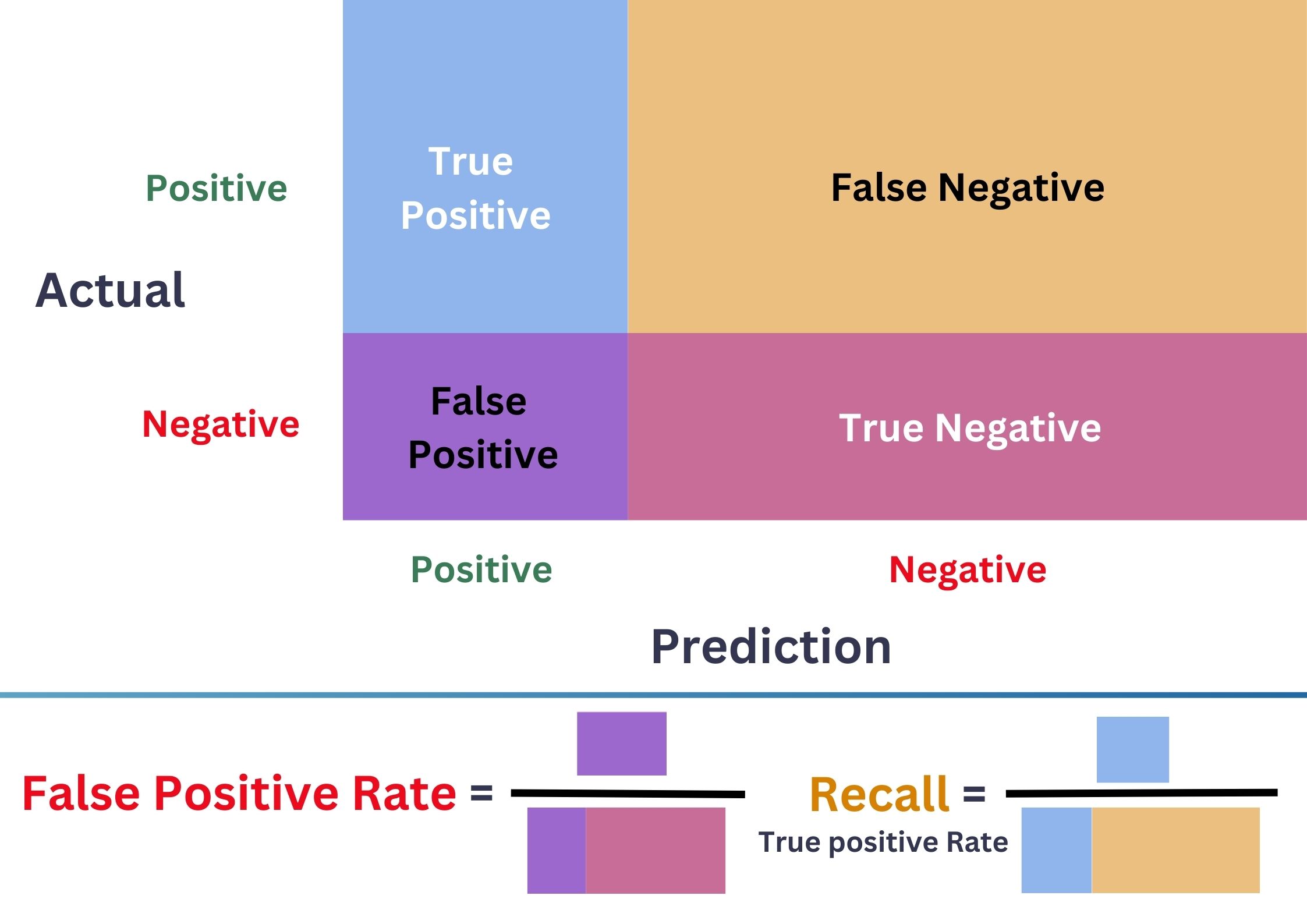
\(\bullet\) ROC \(=\{(\)FPR\(_{\delta}\),TPR\(_{\delta}):\delta\in[0,1]\}\).
\(\bullet\) Better model = Larger Area Under the Curve (AUC).

Code
from sklearn.metrics import roc_curve, RocCurveDisplay
from plotly.tools import mpl_to_plotly

# Method 2: Using roc_curve and Matplotlib directly
y1 = 1*(y_test1 == "spam")
fpr, tpr, thresholds = roc_curve(y1.values, pr1.flatten())
plt.plot([0, 1], [0, 1], 'k--', label='Random Classifier') # Diagonal line
plt.plot(fpr, tpr, label='ROC Curve')

# Figures

fig_full = plt.gcf()
pl_1 = mpl_to_plotly(fig_full)
pl_1.update_layout(width=500, height=450, 
                      title=dict(text="ROC Curve of Full model", 
                                 font=dict(size=25)),
                      xaxis_title = dict(font=dict(size=20, color = "red")),
                      yaxis_title = dict(text='True Positive Rate (Recall)', font=dict(size=20, color = "#EBB31D")),
                      template='plotly_white')
pl_1.show()

1. Imbalanced data ⚠️

Receiver Operating Characteristic Curve (ROC)

\(\bullet\) ROC \(=\{(\)FPR\(_{\delta}\),TPR\(_{\delta}):\delta\in[0,1]\}\).
\(\bullet\) Better model = Larger Area Under the Curve (AUC).

Code
fpr, tpr, thresholds = roc_curve(y1.values, pr2.flatten())
plt.plot(fpr, tpr, label='ROC Curve')
plt.plot([0, 1], [0, 1], 'k--', label='Random Classifier') # Diagonal line

# Figures
fig_2 = plt.gcf()
pl_2 = mpl_to_plotly(fig_2)
pl_2.update_layout(width=500, height=450, 
                      title=dict(text="ROC Curve of 3-input model", 
                                 font=dict(size=25)),
                      xaxis_title = dict(font=dict(size=20, color = "red")),
                      yaxis_title = dict(text='True Positive Rate (Recall)', font=dict(size=20, color = "#EBB31D")),
                      template='plotly_white')
pl_2.show()

1. Imbalanced data ⚠️ (Summary)

Confusion matrix

  • Precision: controlls FP.
  • Recall: controlls FN.
  • F1-score: ballances the two.

ROC Curve & AUC

  • ROC Curve: ballances TPR and FPR.
  • Can be used to select \(\delta\in [0,1]\).
  • Better model = Larger AUC.

1. Imbalanced data ⚠️ (to explore)

  • Sampling methods:
    • Oversampling: random, SMOTE, SMOTE SVM, ADASYN…
    • Undersampling: random, new miss, CNN, Tomek Links…
  • Weight adjustment methods (nonparametric)
    • Tree-based algorithms, \(k\)-NN, kernel methods…
  • Tuning threshold \(\delta\).
  • Work with packages that handle imbalanced data:
  • Helpful links: Geeks for Geeks, Angelleon Collado, Machine Learning Mastery

🥳 It’s party time 🥂