Time Series Forecasting


INS-605: Data Analysis II

Lecturer: Dr. Sothea HAS

helpful resources

🌐 Ch 5, Introduction to Times Series Forecasting with Python by Jason Brownlee (2020).

  • Friendly and more on memorization of the concepts with coding examples.
  • Good for beginners.

🌐 Introduction to Times Series Forecasting 2nd Edition by Peter J. Brockwell and Richard A. Davis (2002).

  • Comprehensive and more on theoretical aspects.
  • Good for intermediate learners.

What You Will Learn

By the end of this section, you should be able to:

  1. Understand and test stationarity of a time series dataset.
  2. Apply transformations to stabilize variance and make a time series stationary.
  3. Identify degree of differencing required to make a time series stationary.
  4. How to use ACF and PACF plots to identify the order of AR and MA terms in ARIMA models.
  5. Build and evaluate ARIMA models for time series forecasting…

1 Time Series Analysis Recap

1.1 Time Series Recap

  • Time series data is a sequence of data points collected or recorded at specific time intervals.
  • It is often used to analyze trends, patterns, and make forecasts based on historical data.
Code
import requests
import pandas as pd
import plotly.graph_objects as go
from plotly.subplots import make_subplots

if os.path.exists("data/meteo-data.csv"):
    # write the data if not already exists
    df = pd.read_csv("data/meteo-data.csv")
else:
    # 1. Define Location Parameters (Phnom Penh, Cambodia)
    # You can change these coordinates to target a different specific region in Cambodia
    LATITUDE = 11.5564
    LONGITUDE = 104.9282
    TIMEZONE = "Asia/CAMBODIA"  # ICT timezone matches Cambodia
    PAST_DAYS = 30  # Fetch the last 30 days of historical data

    # 2. Fetch PM2.5 Data (Open-Meteo Air Quality API)
    aq_url = "https://air-quality-api.open-meteo.com/v1/air-quality"
    aq_params = {
        "latitude": LATITUDE,
        "longitude": LONGITUDE,
        "hourly": "pm2_5",
        "timezone": TIMEZONE,
        "past_days": PAST_DAYS,
        "forecast_days": 0 # We only want historical data, not forecast
    }
    aq_response = requests.get(aq_url, params=aq_params).json()

    # 3. Fetch Precipitation Data (Open-Meteo Weather API)
    wx_url = "https://api.open-meteo.com/v1/forecast"
    wx_params = {
        "latitude": LATITUDE,
        "longitude": LONGITUDE,
        "hourly": "precipitation",
        "timezone": TIMEZONE,
        "past_days": PAST_DAYS,
        "forecast_days": 0
    }
    wx_response = requests.get(wx_url, params=wx_params).json()

    # 4. Convert JSON responses into Pandas DataFrames
    df_aq = pd.DataFrame(aq_response['hourly'])
    df_wx = pd.DataFrame(wx_response['hourly'])

    # Convert the string time columns into proper datetime objects
    df_aq['time'] = pd.to_datetime(df_aq['time'])
    df_wx['time'] = pd.to_datetime(df_wx['time'])

    # Merge both DataFrames on the 'time' column
    df = pd.merge(df_aq, df_wx, on='time', how='inner')

    # Drop missing values (if any)
    df.dropna(inplace=True)
    df.to_csv("data/meteo-data.csv", index=False) or df

# Initialize a figure with secondary y-axis capabilities
fig0 = make_subplots(
    rows=1, cols=2,
    vertical_spacing=0.02
)

fig0.add_trace(
    go.Scatter(
        x=df['time'], 
        y=df['precipitation'], 
        name="Precipitation (mm)", 
        mode='lines',
        line=dict(color="#5D9CEC", width=2),
        opacity=0.8,
        showlegend=True
    ),
    row=1, col=1
)

# Add PM2.5 as a Line chart (Primary Y-axis)
fig0.add_trace(
    go.Scatter(
        x=df['time'], 
        y=df['pm2_5'], 
        name="PM2.5 (µg/m³)", 
        mode='lines', 
        line=dict(color='#E56353', width=2),
        showlegend=True
    ),
    row=1, col=2
)

fig0.update_layout(
    title="PM2.5 and Precipitation in Phnom Penh (Past 30 Days)<br>Source: <a href='https://open-meteo.com'>Open-Mete API</a>",
    width=950,
    height=210,
    margin=dict(l=20, r=20, t=60, b=20))

# Customize axes aesthetics
fig0.update_xaxes(showgrid=True, gridwidth=1, gridcolor='lightgray', title_text="Day")
fig0.update_yaxes(title_text="<b>PM2.5</b> (µg/m³)", color="#E56353", showgrid=False, row=1, col=2)
fig0.update_yaxes(title_text="<b>Precipitation</b> (mm)", color="#5D9CEC", showgrid=False, row=1, col=1)
fig0.show()
  • Forecast: predicting future values based on historical data.
  • Prediction: estimating target values using other features.

1.2 ACF and PACF Recap

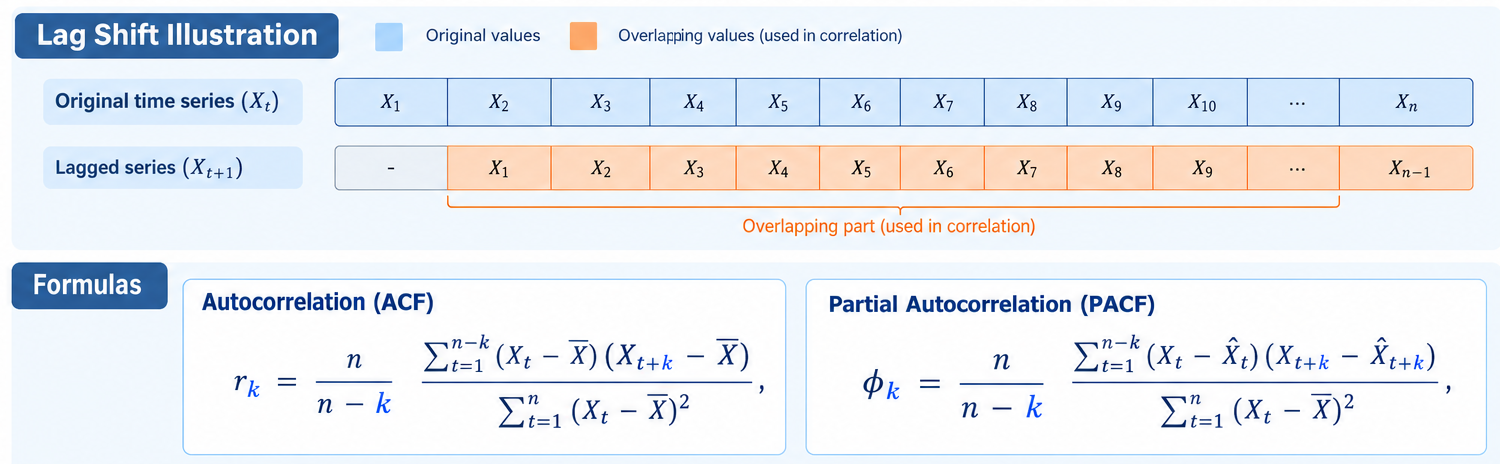
  • ACF (Autocorrelation Function): measures the correlation between a time series and its lagged values.
  • PACF (Partial Autocorrelation Function): measures the correlation between a time series and its lagged values after removing the effects of shorter lags.

\(n\) is the number of observations and \(\widehat{X}_t=\sum_{j=1}^{k-1}\hat{\beta}_jX_{t-j}\) is the predicted value of \(X_t\) using its lags \(1,...,k-1\).

Visualization of ACF and PACF

Visualization of ACF and PACF

Code
import numpy as np
import plotly.graph_objects as go
from plotly.subplots import make_subplots
from statsmodels.tsa.stattools import acf, pacf

BLUE, GREY = "#2E6FDB", "#4A4A4A"


def add_corr_plot(fig, values, conf, lags, row, col, title):
    """Stem plot + shaded confidence band, like statsmodels' plot_acf/plot_pacf.
    values: correlation per lag; conf: (n_lags, 2) CI already centred at 0."""
    # Confidence band (shaded area)
    fig.add_trace(go.Scatter(x=lags, y=conf[:, 1], mode="lines",
                             line=dict(width=0), hoverinfo="skip",
                             showlegend=False), row=row, col=col)
    fig.add_trace(go.Scatter(x=lags, y=conf[:, 0], mode="lines",
                             line=dict(width=0), fill="tonexty",
                             fillcolor="rgba(46,111,219,0.15)",
                             hoverinfo="skip", showlegend=False),
                  row=row, col=col)
    # Stems (thin bars) + dots on top
    fig.add_trace(go.Bar(x=lags, y=values, width=0.08, marker_color=BLUE,
                         showlegend=False, hoverinfo="skip"), row=row, col=col)
    fig.add_trace(go.Scatter(x=lags, y=values, mode="markers",
                             marker=dict(color=BLUE, size=8),
                             showlegend=False,
                             hovertemplate="lag %{x}<br>%{y:.3f}<extra></extra>"),
                  row=row, col=col)
    fig.update_xaxes(title_text="Lag", showgrid=False, zeroline=False,
                     dtick=5, row=row, col=col)
    fig.update_yaxes(title_text=title, range=[-1.05, 1.05], gridcolor="#F0F0F0",
                     zerolinecolor="#999999", row=row, col=col)


def plotly_acf_pacf(y, nlags=20, alpha=0.05, title=None, side_by_side = True, height = 210, width = 950):
    n = len(y)
    lags = np.arange(nlags + 1)

    # ACF with Bartlett confidence intervals (centred at zero, as in statsmodels)
    acf_vals, acf_ci = acf(y, nlags=nlags, alpha=alpha, fft=False)
    acf_ci = acf_ci - acf_vals[:, None]

    # PACF with the usual +/- z / sqrt(n) band
    pacf_vals = pacf(y, nlags=nlags, method="ywm")
    z = 1.959963984540054  # norm.ppf(1 - alpha/2) for alpha = 0.05
    band = z / np.sqrt(n)
    pacf_ci = np.column_stack([-band * np.ones(nlags + 1),
                               band * np.ones(nlags + 1)])
    if side_by_side:
        fig = make_subplots(rows=1, cols=2, horizontal_spacing=0.08,
                        subplot_titles=("Autocorrelation (ACF)",
                                        "Partial Autocorrelation (PACF)"))
        add_corr_plot(fig, acf_vals, acf_ci, lags, 1, 1, f"ACF of {title}")
        add_corr_plot(fig, pacf_vals, pacf_ci, lags, 1, 2, f"PACF of {title}")
    else:
        fig = make_subplots(rows=2, cols=1, horizontal_spacing=0.08,
                        subplot_titles=("Autocorrelation (ACF)",
                                        "Partial Autocorrelation (PACF)"))
        add_corr_plot(fig, acf_vals, acf_ci, lags, 1, 1, f"ACF of {title}")
        add_corr_plot(fig, pacf_vals, pacf_ci, lags, 2, 1, f"PACF of {title}")
    

    fig.update_layout(template="plotly_white", paper_bgcolor="white",
                      plot_bgcolor="white", height=height, width=width,
                      font=dict(family="Helvetica, Arial, sans-serif",
                                color=GREY),
                      margin=dict(l=50, r=30, t=20, b=20))
    for a in fig.layout.annotations:
        a.font = dict(size=14, color=GREY)
    return fig

fig_pm25 = plotly_acf_pacf(df['pm2_5'], nlags=25, alpha=0.05, title='PM 2.5 (µg/m³)')
fig_pm25.show()

  • ACF indicates how much current values related to its past lags while PACF indicates how much current values related to its past lags after removing the effects of the intermediate lags. They’re useful for forecasting models.

2 Stationarity in Time Series

2.1 Stationary Time Series

  • A stationary time series is one whose statistical properties (like mean, variance, and autocorrelation) do not change over time.
  • In other words, it does not exhibit trends or seasonal effects.
  • Stationary time series is stable and predictable, making it easier to model and forecast.

Stationarity Detection: Visualization

Stationary Time Series

  • A time series is considered (weakly) stationary if \(\mathbb{E}(X_t) = \mu, \mathbb{V}(X_t)=\sigma^2, \text{Cov}(X_t,X_{t-k})=\gamma_k,\) for all \(t>0\), are all constant over time and depends only on the lag \(k\).
  • Is there a trend or seasonality in the series? (mean).
  • Does it spread wider or shrink down over time? (variance).

Augmented Dickey-Fuller (ADF) Test

Augmented Dickey-Fuller Test

  • The Augmented Dickey-Fuller (ADF) test is a statistical test used to determine whether a time series is stationary or has a unit root (non-stationary).
  • Hypothesis: \(H_0:\) the time series is non-stationary vs \(H_1:\) it’s stationary.
  • Decision at significance level \(\color{red}{\alpha}\):
    • If \(\text{p-value}<{\color{red}{\alpha}}\), the time series is stationary.
    • Else, no evidence to reject non-stationarity of the time series.
from statsmodels.tsa.stattools import adfuller
result1 = adfuller(stationary)  # Test
result2 = adfuller(non_stationary)  # Test
print("1. ADF Test Results for the 1st Series:")
print(f"* p-value: {result1[1]}")
print("\n2. ADF Test Results for the 2nd Series:")
print(f"* p-value: {result2[1]}")
1. ADF Test Results for the 1st Series:
* p-value: 6.002306694059072e-17

2. ADF Test Results for the 2nd Series:
* p-value: 0.5792277085254994

For technical details, read Chapter 6, section 6.2 of the Peter J. Brockwell and Richard A. Davis (2002)

3 Time Series Transformations

3.1 Transformations

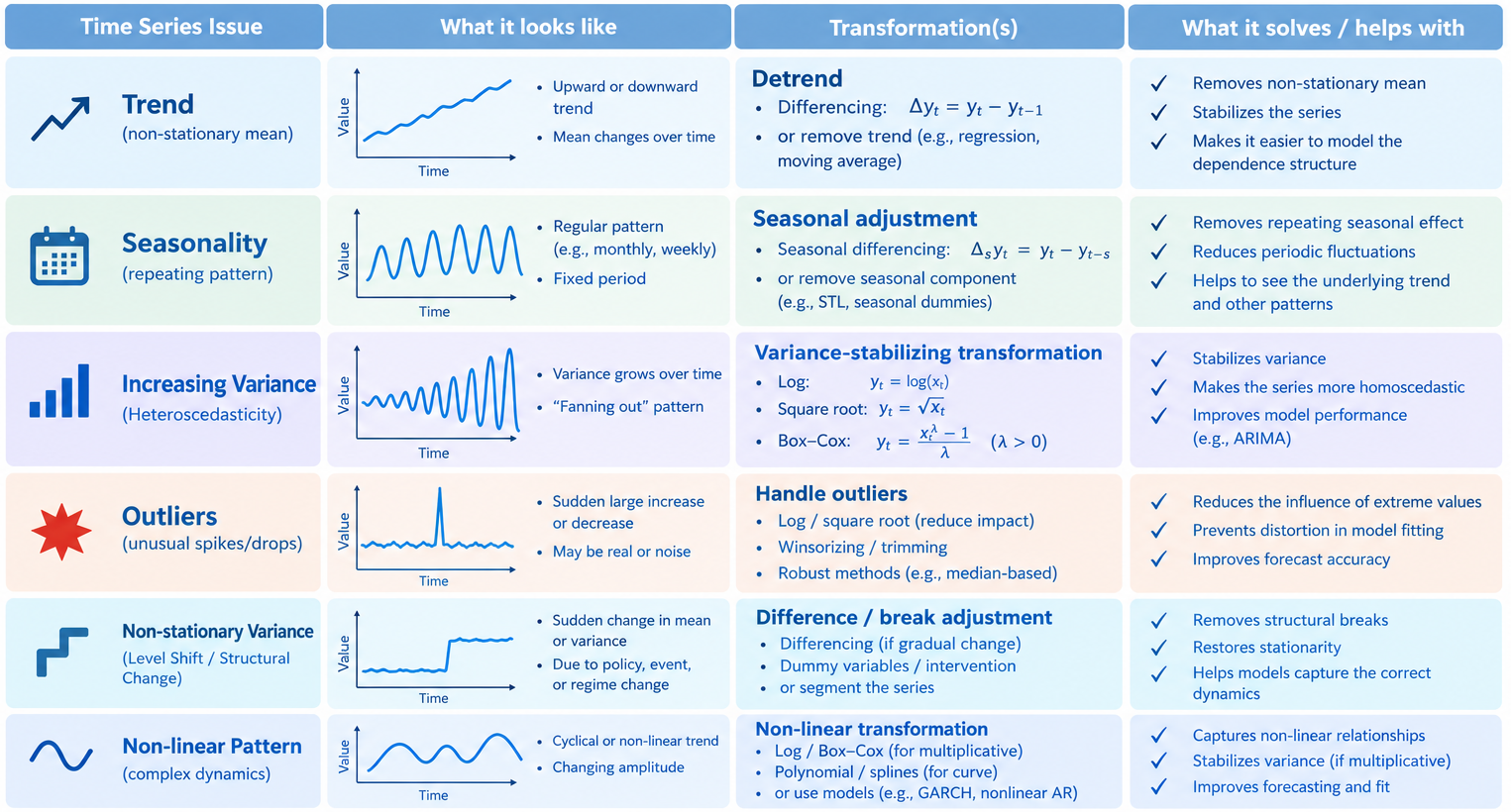
  • Transformations are used to stabilize the variance, making the time series stationary, or reduce influential outliers.
  • Transformations for stabilizing variance:
    • Box-Cox Transformation: for some \(\lambda>0\) and \(X_t>0\): \[\tilde{X}_t=\begin{cases}\frac{X_t^\lambda-1}{\lambda} & \text{if } \lambda \neq 0\\ \ln(X_t) & \text{if } \lambda = 0 \end{cases}\]
    • Square Root Transformation: \(\tilde{X}_t=\sqrt{X_t}.\)
  • Differentiation to remove trend and seasonality:
    • First Order Differentiation: \(\Delta X_t=\Delta^1 X_t=X_t-X_{t-1}.\)
    • \(k\)-order Differentiation: \(\Delta^k X_t=\Delta^{k-1} X_t-\Delta^{k-1} X_{t-1}\).
  • Normalization and Standardization…

Visualizing Transformations

Transformation summary

4 Autoregression (AR) & Moving Average (MA) Models

4.1 Autoregression (AR) Models

  • A natural way to predict the next value of a stationary time series \(X_t\) would be to use its previous values (lags).
  • The simplest form of this is an Autoregression model of degree \(p\), \[X_t={\color{blue}{\phi_0}}+{\color{blue}{\phi_1}} X_{t-1}+{\color{blue}{\phi_2}} X_{t-2}+\cdots +{\color{blue}{\phi_p}} X_{t-p}+\epsilon_t\] for some parameters \({\color{blue}{\phi_j}}\) (to be estimated) and error term \(\epsilon_t\).
  • This means we should look at PACF plot to detect \(\color{blue}{p}\).

AR as Linear Regression

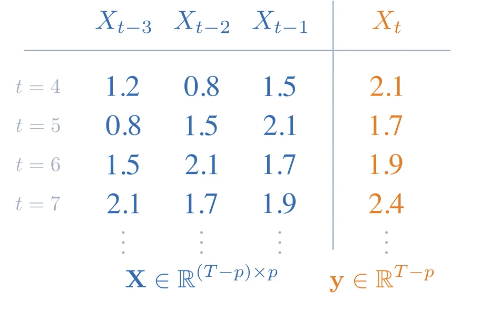
  • AR(\(p\)): \(X_t={\color{blue}{\phi_0}}+{\color{blue}{\phi_1}} X_{t-1}+{\color{blue}{\phi_2}} X_{t-2}+\cdots +{\color{blue}{\phi_p}} X_{t-p}+\epsilon_t\).

Estimating Parameters in AR Models

  • In AR(\(p\)) with parameters \(\color{blue}{\beta}=({\color{blue}{\phi_0}},{\color{blue}{\phi_1}},\ldots,{\color{blue}{\phi_p}})\), we can estimate the parameters using Ordinary Least Squares (OLS): \[\widehat{\beta} = \arg\min_{{\color{blue}{\beta}}}\sum_{t=p+1}^T (X_t - \textbf{X}{\color{blue}{\beta}})^2, \text{ where }\textbf{X} \text{ uses }p\text{ lags of }X_t.\]
  • OLS solution: \(\widehat{\beta}=(\textbf{X}\textbf{X})^{-1}\textbf{X}^TY\), where \({\color{orange}{Y}} = (X_{p+1},\ldots,X_n)^T\).

4.2 Moving Average (MA) Models

  • Another idea for predicting stationary time series \(X_t\) is to use residuals/shocks from each lag of \(X_t\).
  • The simplest form of this is a Moving Average model of degree \(q\), \[X_t={\color{red}{\theta_0}}+{\color{red}{\theta_1}} \epsilon_{t-1}+{\color{red}{\theta_2}} \epsilon_{t-2}+\cdots +{\color{red}{\theta_q}} \epsilon_{t-q}+\epsilon_t\] for some parameters \({\color{red}{\theta_j}}\) (to be estimated) and error term \(\epsilon_t\).
  • This means we should look at ACF plot to detect \(\color{red}{q}\).

MA as Linear Regression

  • MA(\(q\)): \(X_t={\color{red}{\theta_0}}+{\color{red}{\theta_1}} \epsilon_{t-1}+{\color{red}{\theta_2}} \epsilon_{t-2}+\cdots +{\color{red}{\theta_q}} \epsilon_{t-q}+\epsilon_t\).

Estimating Parameters in MA Models

  • In MA(\(\color{red}{q}\)) with parameters \(\color{red}{\theta}=({\color{red}{\theta_0}},{\color{red}{\theta_1}},\ldots,{\color{red}{\theta_p}})\), Ordinary Least Squares (OLS) fails because residual \(\epsilon_t\) are not observed and depend on \(\color{red}{\theta}\).
  • In this case, we use Conditional Least Squares (CLS) + Numerical Iterations to estimate \({\color{red}{\theta}}\).
  • Sum of Squared Residuals: \(\color{red}{\text{SSR}}({\color{red}{\theta}})=\sum_{t=1}^T\epsilon_t^2(\color{red}{\theta})\).
  • We iteratively update \({\color{red}{\theta}}\) to minimize SSR.
    • Initialization: Start with a guess for \({\color{red}{\theta}_0}\).
    • Recursive Filtering: Construct error matrix \({\color{darkgreen}{E}}\) & target \({\color{orange}{Y}}\).
    • Update: \({\color{red}{\theta}_{\text{new}}}=\arg\min_{{\color{red}{\theta}}}\color{red}{\text{SSR}}({\color{red}{\theta}})\) and update \({\color{red}{\theta_0}}={\color{red}{\theta_{\text{new}}}}\).
    • Repeat until convergence.

Applications on PM2.5

  • Consider PM 2.5 dataset:
Code
import numpy as np
import pandas as pd
from statsmodels.tsa.stattools import adfuller
from statsmodels.tsa.arima.model import ARIMA
import plotly.graph_objects as go

# 2. Test if the differenced series is stationary (ADF Test)
diff_clean = df['pm2_5'].diff(1).dropna()
adf_result = adfuller(diff_clean)

print("-> DF Test on Differenced Data")
print(f"ADF Statistic: {adf_result[0]:.4f}")
print(f"p-value: {adf_result[1]:.4f}")
if adf_result[1] < 0.05:
    print("Result: Stationary (Reject the null hypothesis)\n")
else:
    print("Result: Non-Stationary (Fail to reject the null hypothesis)\n")

# 3. Train/Test Split (Last 10% for testing)
train_size = int(len(df) * 0.95)
train_data = df['pm2_5'].iloc[:train_size]
test_data = df['pm2_5'].iloc[train_size:]

# 4. Train AR(p=2) on the training set
print("-> Training AR(2) + 1 Dif...")
model = ARIMA(train_data, order=(2, 1, 0))
fitted_model = model.fit()
print("-> Training MA(26) + 1 Dif...")
mod2 = ARIMA(train_data, order=(0, 1, 26))
fitted_mod2 = mod2.fit()

# 5. Generate Predictions
# In-sample fitted values for training data
train_pred = fitted_model.fittedvalues
train_pred2 = fitted_mod2.fittedvalues

# Out-of-sample forecast for testing data
test_pred = fitted_model.forecast(steps=len(test_data))
test_pred2 = fitted_mod2.forecast(steps=len(test_data))
test_pred.index = test_data.index  # Align timestamps
-> DF Test on Differenced Data
ADF Statistic: -9.6360
p-value: 0.0000
Result: Stationary (Reject the null hypothesis)

-> Training AR(2) + 1 Dif...
-> Training MA(26) + 1 Dif...

5 Autoregressive Integrated Moving Average (ARIMA) Models

5.1 ARIMA(p,d,q) Model

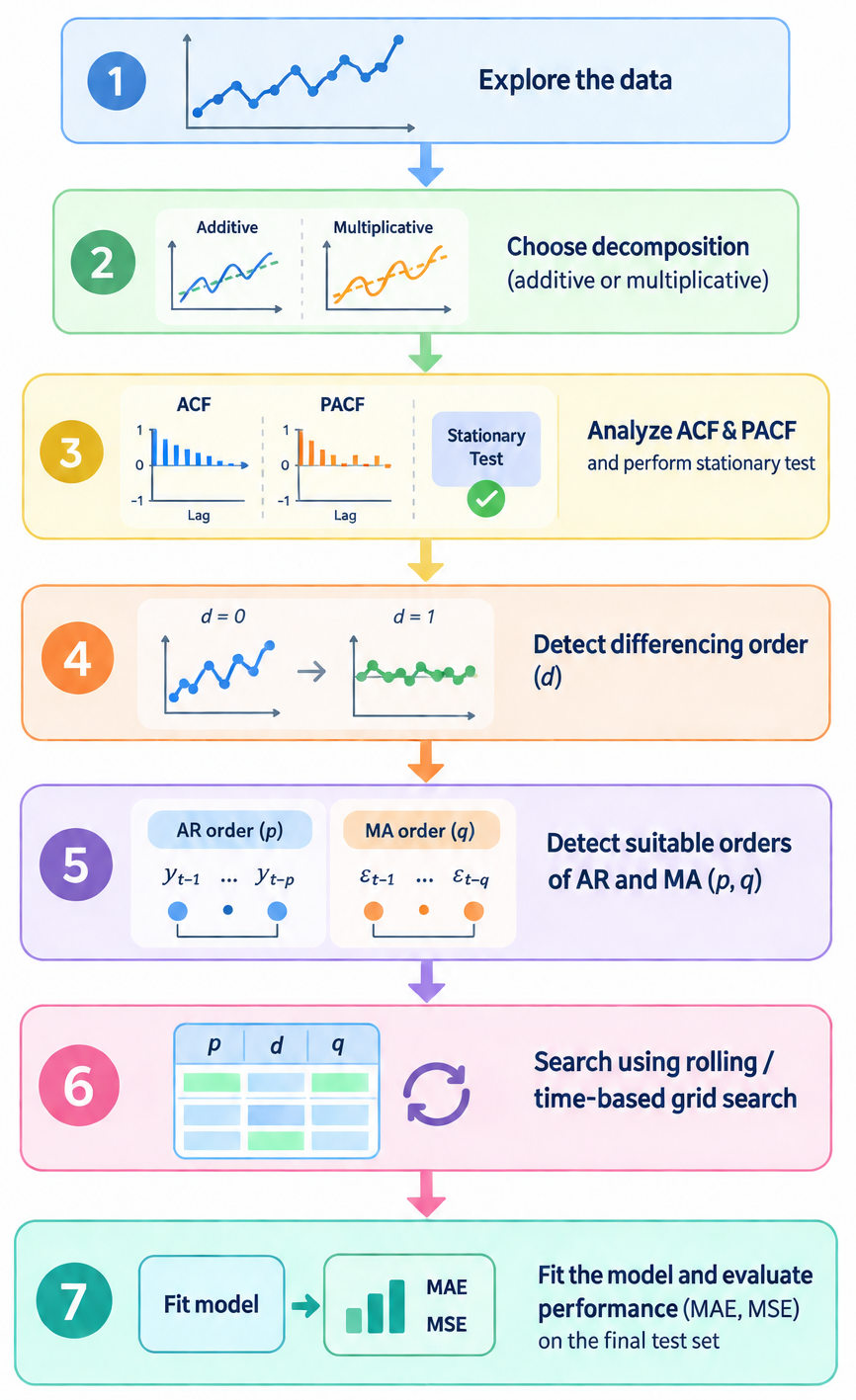
  • ARIMA(\(p,d,q\)) combines autoregression, differencing, and moving-average components:
    • (\(p\)): AR order, guided by PACF.
    • (\(d\)): differencing order, guided by stationarity (ADF test).
    • (\(q\)): MA order, guided by ACF.
  • To compare models, use AIC and BIC criteria: lower values indicate better fit. For candidate parameter (\(\widehat{p},\widehat{d},\widehat{q}\)):
    • \(\text{AIC}=-2\log L(\widehat{p},\widehat{d},\widehat{q})+2k\),
    • \(\text{BIC}=-2\log L(\widehat{p},\widehat{d},\widehat{q})+k\log n\), where \(k\) is the number of parameters, \(n\) is the sample size.

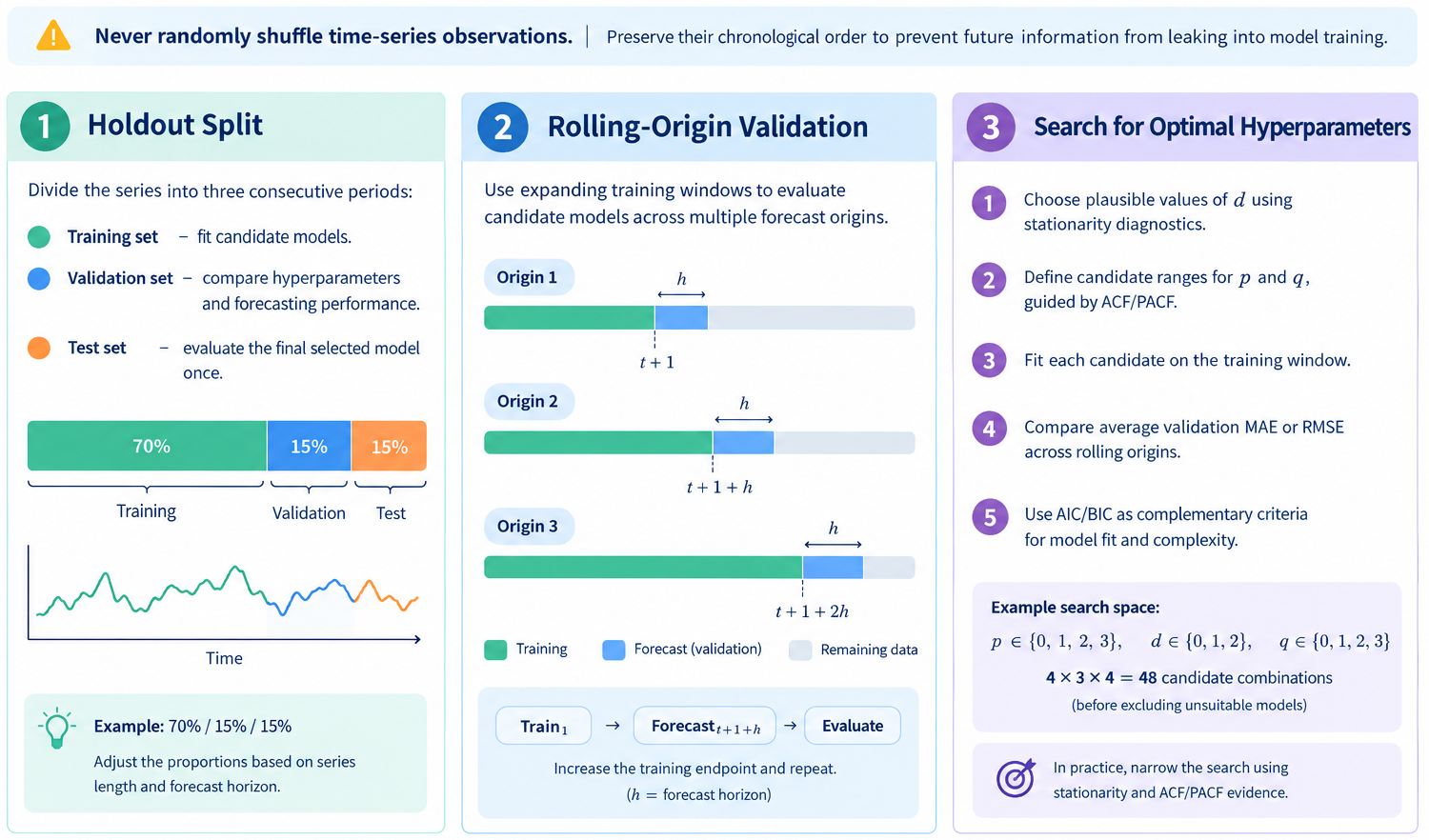
Time Series Data Splitting

Application on PM 2.5

  • We implement ARIMA(2, 1, 26) on the PM 2.5 data.
RMSE/mean(Y) MAPE
AR(2) 0.346766 0.396270
MA(26) 0.217644 0.208479
ARIMA(2,1,26) 0.207716 0.179381

Transformation + ARIMA

  • Applied sqaure root transformation: \(Y_t = \sqrt{X_t}\)
1). DF Test on Sqrt PM 2.5
* ADF Statistic: -1.9236
* p-value: 0.3211
* Result: Non-Stationary (Fail to reject the null hypothesis)

2). DF Test on Differenced Sqrt PM 2.5
* ADF Statistic: -9.6360
* p-value: 0.0000
* Result: Stationary (Reject the null hypothesis)
  • Compare: AR(2), MA(26) with 1 diff. and ARIMA(2, 1, \(q\)), with CV for \(q\).
Code
import pmdarima as pm
from sklearn.model_selection import TimeSeriesSplit

print("1). Training AR(2) + 1 Dif...")
mod1 = ARIMA(train_data, order=(2, 1, 0))
fitted_mod1 = mod1.fit()
print("2). Training MA(26) + 1 Dif...")
mod2 = ARIMA(train_data, order=(0, 1, 12))
fitted_mod2 = mod2.fit()


# search:

# from statsmodels.tsa.arima.model import ARIMA
# from sklearn.metrics import mean_squared_error

# # Fixed parameters from previous setup, searching q from 10 to 30
p_val = 2
d_val = 1
# q_range = range(4, 36)

# # Initialize 5-fold Time Series Split (Rolling/Expanding Window)
# tscv = TimeSeriesSplit(n_splits=10)

# # Dictionary to store mean evaluation metrics for each q
# cv_results = {}

# for q_val in q_range:
#     fold_scores = []
#     for fold, (train_index, val_index) in enumerate(tscv.split(train_data)):
#         # Split data for the current fold
#         fold_train = train_data.iloc[train_index]
#         fold_val = train_data.iloc[val_index]
        
#         try:
#             # Fit ARIMA model on the fold's training slice
#             model = ARIMA(fold_train, order=(p_val, d_val, q_val))
#             fitted_model = model.fit()
            
#             # Forecast for the exact length of the validation slice
#             predictions = fitted_model.forecast(steps=len(fold_val))
            
#             # Compute Root Mean Squared Error (RMSE) for this fold
#             rmse = np.sqrt(mean_squared_error(fold_val, predictions))
#             fold_scores.append(rmse)
            
#         except Exception as e:
#             # High-order MA parameters can occasionally throw convergence warnings/errors
#             print(f"  [Warning] ARIMA({p_val}, {d_val}, {q_val}) failed on Fold {fold+1}: {e}")
#             fold_scores.append(np.nan)
            
#     # Calculate average RMSE across all 5 folds for the current q
#     mean_rmse = np.nanmean(fold_scores)
#     cv_results[q_val] = mean_rmse
# q_star = min(cv_results, key=cv_results.get)
q_star = 32
print(f"3). Training ARIMA(2, 1, {q_star})...")

mod3 = ARIMA(train_data, order=(p_val, d_val, q_star))
fitted_mod3 = mod3.fit()
train_pred1 = fitted_mod1.fittedvalues
train_pred2 = fitted_mod2.fittedvalues
train_pred3 = fitted_mod3.fittedvalues

# Out-of-sample forecast for testing data
test_pred1 = fitted_mod1.forecast(steps=len(test_data))
test_pred2 = fitted_mod2.forecast(steps=len(test_data))
test_pred3 = fitted_mod3.forecast(steps=len(test_data))
1). Training AR(2) + 1 Dif...
2). Training MA(26) + 1 Dif...
3). Training ARIMA(2, 1, 32)...

ARIMA with square root transformation

Code
fig_transform = go.Figure()

# Original Training Data
fig_transform.add_trace(go.Scatter(
    x=train_data.index, y=train_data ** 2, 
    mode='lines', name='Actual Train Data', 
    line=dict(color='red', width=1.5)
))

# Training Predictions (Fitted Values)
fig_transform.add_trace(go.Scatter(
    x=train_pred.index, y=train_pred1 ** 2, 
    mode='lines', name='Train Predictions AR(2)', 
    line=dict(color='orange', width=1.5, dash='dot')
))

fig_transform.add_trace(go.Scatter(
    x=train_pred.index, y=train_pred2 ** 2, 
    mode='lines', name='Train Predictions MA(26)', 
    line=dict(color='green', width=1.5, dash='dot')
))

fig_transform.add_trace(go.Scatter(
    x=train_pred.index, y=train_pred3 ** 2, 
    mode='lines', name=f'Train Predictions ARIMA(2, 1, {q_star})', 
    line=dict(color='blue', width=1.5, dash='dot')
))

# Original Test Data
fig_transform.add_trace(go.Scatter(
    x=test_data.index, y=test_data ** 2, 
    mode='lines', name='Actual Test Data', 
    line=dict(color='black', width=1.5)
))

# Test Predictions (Forecast)
fig_transform.add_trace(go.Scatter(
    x=test_pred.index, y=test_pred1 ** 2, 
    mode='lines', name='Test Forecast AR(2)', 
    line=dict(color='orange', width=2, dash = 'dot')
))

# Test Predictions (Forecast)
fig_transform.add_trace(go.Scatter(
    x=test_pred.index, y=test_pred2 ** 2, 
    mode='lines', name='Test Forecast MA(26)', 
    line=dict(color='green', dash='dot', width=2)
))

# Test Predictions (Forecast)
fig_transform.add_trace(go.Scatter(
    x=test_pred.index, y=test_pred3 ** 2, 
    mode='lines', name=f'Test Forecast ARIMA(2,1,{q_star})', 
    line=dict(color='blue', dash='dot', width=2)
))

# Layout Customization
fig_transform.update_layout(
    width=950,
    height=300,
    title=f"<b>AR(2), MA(26) and ARIMA(2,1,{q_star}) Predictions on PM2.5 Data</b>",
    xaxis_title="Time",
    yaxis_title=r"$\text{PM2.5 }(\mu g/m^3)$",
    hovermode="x unified",
    plot_bgcolor='white',
    legend=dict(x=0.01, y=0.98, bgcolor='rgba(255,255,255,0.8)')
)
fig_transform.update_xaxes(showgrid=True, gridcolor='lightgray')
fig_transform.update_yaxes(showgrid=True, gridcolor='lightgray')
fig_transform.show()
RMSE/mean(Y) MAPE
AR(2) 0.353539 0.417997
MA(26) 0.208891 0.176429
ARIMA(2,1,32) 0.240726 0.216440

Summary

🄳 Yeahhhh šŸ„‚!!!


Let’s take a break!